
Creator marketing for restaurants and QSR chains: a multi-location playbook
Influencer marketing for restaurants and QSR chains: local creators per outlet, limited-time offers, per-creator codes redeemed at the till, footfall proxies.
Influencer marketing for restaurants and QSR (quick-service restaurant) chains works when you treat each outlet as its own small market. Give two or three local creators per outlet a fixed fee, meal vouchers and their own promo code. Build the campaign around a limited-time offer (LTO) with an end date. Then count the codes redeemed at the till, the clicks into delivery apps and the orders on your own site, outlet by outlet.
A national creator with a million followers is the wrong buy for most chains. A burger bar in Ruzafa, Valencia, sells to people who can get there in fifteen minutes. A creator whose followers live in Bilbao or Buenos Aires gives you reach you cannot use, and one code for the whole country cannot tell you which outlet the sales came from. A food creator with 25,000 followers who lives two streets away can fill the counter on a Thursday night.
This playbook covers a multi-location LTO from start to finish: mapping creators to outlets, designing the offer, paying creators, setting up attribution at the counter and in delivery apps, briefing restaurant staff, reading footfall, and a worked example with illustrative numbers. It extends the QSR section of our creator commerce playbooks by industry, and it is written for brand and agency teams running restaurant chains in Spain, the EU and Latin America.
What makes creator marketing different for restaurants?
Restaurant creator campaigns differ from ecommerce campaigns in three ways: the sale is local, the decision is fast, and most of the money changes hands somewhere you cannot put a tracking tag. Those three facts change the creator mix, the offer and the measurement.
| Ecommerce brand | Restaurant or QSR chain | |
|---|---|---|
| Where the buyer can be | Anywhere the store ships | Within a short trip or delivery radius of an outlet |
| Time from post to purchase | Days to weeks | Hours to a few days |
| Where the sale happens | Your own checkout | The counter, a delivery app, your own ordering site |
| Average ticket | Often tens of euros or more | Often a single meal per order |
| Main attribution surface | Tracking link with an on-page tag or pixel | Per-creator promo code recorded at the till |
| What breaks most often | Cookie consent, cross-device journeys | Staff who do not record the code |
The last row matters most. In ecommerce the code goes into a checkout field and the system records it. In a restaurant a person has to record it during a rush. The rest of this playbook is built around making that step easy.
Step 1: Map outlets to local creators
Start with your outlets, not with a creator list. For each outlet, define a catchment: the area most of its customers come from. For a city-centre counter that may be a fifteen-minute walk. For a drive-through on a ring road it may be a twenty-minute drive. Your own loyalty or delivery data usually shows it.
Then find creators whose audience lives inside each catchment. Four rules help:
- Two or three creators per outlet. One creator is a single point of failure. Five or more for one outlet starts to overlap the same followers.
- Local proof over follower count. Look for creators who post about that neighbourhood or city: local restaurants, markets, events, their own street. Captions and locations in recent posts are better evidence than a bio line.
- Median views, not followers. Price on the views a typical recent post gets. Our guide on how much to pay a micro-influencer covers the method.
- One code per creator, and one outlet per creator. If a creator sits between two outlets, assign them to the one their content is closest to. A creator-to-outlet list is what turns codes into per-outlet results.
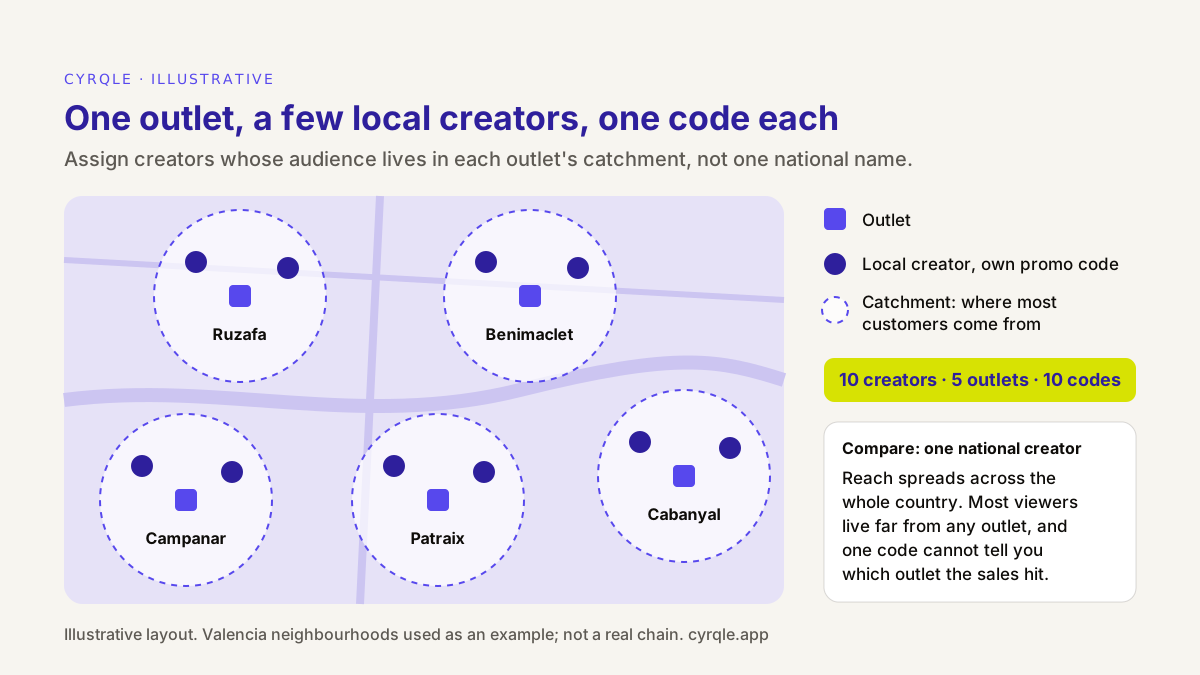
Keep the creator-to-outlet list in the same place as the codes. A simple table with outlet, creator, code and post date is enough. You need it again when you read the results.
Step 2: Build the campaign around a limited-time offer
A limited-time offer gives the post a reason to exist and the customer a reason to come this week. It also gives you a clean measurement window. Good restaurant LTOs share four traits:
- One clear item or deal. A new burger, a lunch menu, a seasonal drink, a two-for-one on a quiet weekday. One sentence should explain it.
- A short, fixed window. One to three weeks is typical for QSR. Put the end date in the creator's brief, on the staff sheet and in the till.
- A code benefit that staff can apply fast. A free side, a free drink, or a fixed amount off. Percentage discounts on mixed baskets slow down the counter.
- A reason to say the code. If the offer is available to everyone without a code, customers will not say it, and the sale stays invisible. The code should unlock something.
Plan around the local calendar as well as your menu calendar. In Spain, big football nights, the summer terrace season and local fiestas (Fallas in Valencia, San Fermín in Pamplona) move footfall. In Mexico, school holidays and national matches do the same. If you plan around a tournament, our World Cup 2026 creator campaign guide shows the lead times.
Step 3: Pay local creators with a fee plus meal vouchers
Most restaurant creator deals work best as a fixed fee plus product. The fee pays for the content and the timing. The product is a set of meal vouchers the creator can use and share, which also gets the creator into the restaurant to film.
| Product only (meal vouchers) | Fixed fee plus vouchers | Commission on sales | |
|---|---|---|---|
| Cost per creator | Food cost only | Fee plus food cost | A share of attributed sales |
| What it guarantees | Nothing: the creator may not post | The agreed posts on the agreed dates | Nothing up front |
| Fits best | Opening of a new outlet, nano creators who already love the place | LTO launches, most local micro creators | Long-running ambassadors with their own regular code |
| Attribution needed | Code per creator, to learn who brings customers | Code per creator, for reporting | Code per creator, recorded reliably at every till |
| Main risk | Low post rate, unlabelled posts | Paying for reach outside the catchment | Small tickets make the commission tiny; missed codes cause disputes |
Commission is harder in restaurants than in ecommerce. Tickets are small, many orders go through delivery apps where you only see a report, and a code that a cashier forgets to record means a creator loses money through no fault of their own. Keep commission for long-term local ambassadors, and only once the counter process works. Our comparison of CPM, CPE, CPA and flat-fee pricing explains when a performance fee is worth the friction.
Whatever you pay, put the deal in writing: the posts, the dates, the offer wording, the code, the label, and what you may do with the content afterwards. Our creator brief template has a section for each.
Step 4: Set up attribution at the counter, in delivery apps and online
A restaurant chain sells through three channels, and each one needs its own attribution surface. Plan all three before the first post goes live. Our comparison of discount codes, tracking links and pixels explains the trade-offs between the methods in general.
| Channel | Attribution surface | What you see | What you miss |
|---|---|---|---|
| Counter and drive-through | Per-creator promo code, recorded by staff on a cashier redemption page | Each redeemed code, the sale amount and the creator | Customers who saw the post but did not say the code |
| Delivery apps (Glovo, Uber Eats, Just Eat in Spain; Rappi, DiDi Food, Uber Eats in Mexico) | Tracking link that sends the viewer to your outlet's page in the app, plus the app's own promotion report | Clicks per creator; orders and redemptions in the app's report | The link between a specific click and a specific app order |
| Your own website or ordering app | Tracking link plus an on-page tag on your own site | Clicks and orders on your own checkout, by creator | Buyers who reject cookies and do not use the code |
At the counter: a cashier redemption page
The counter is where most restaurant sales happen, and it is where most attribution plans fail. Integrating a point-of-sale system across many outlets, often run by franchisees on different systems, takes months. A cashier redemption page avoids that. It is a web page that opens in a browser on a phone or tablet behind the counter.
The flow takes a few seconds per order:
- The customer says or shows the creator's code.
- Staff apply the discount in your till, as with any other promotion.
- On the redemption page, staff type the code and the sale amount and tap Validate code. The page shows which creator and campaign the code belongs to.
- Staff tap Apply. The sale is recorded and attributed to that creator.
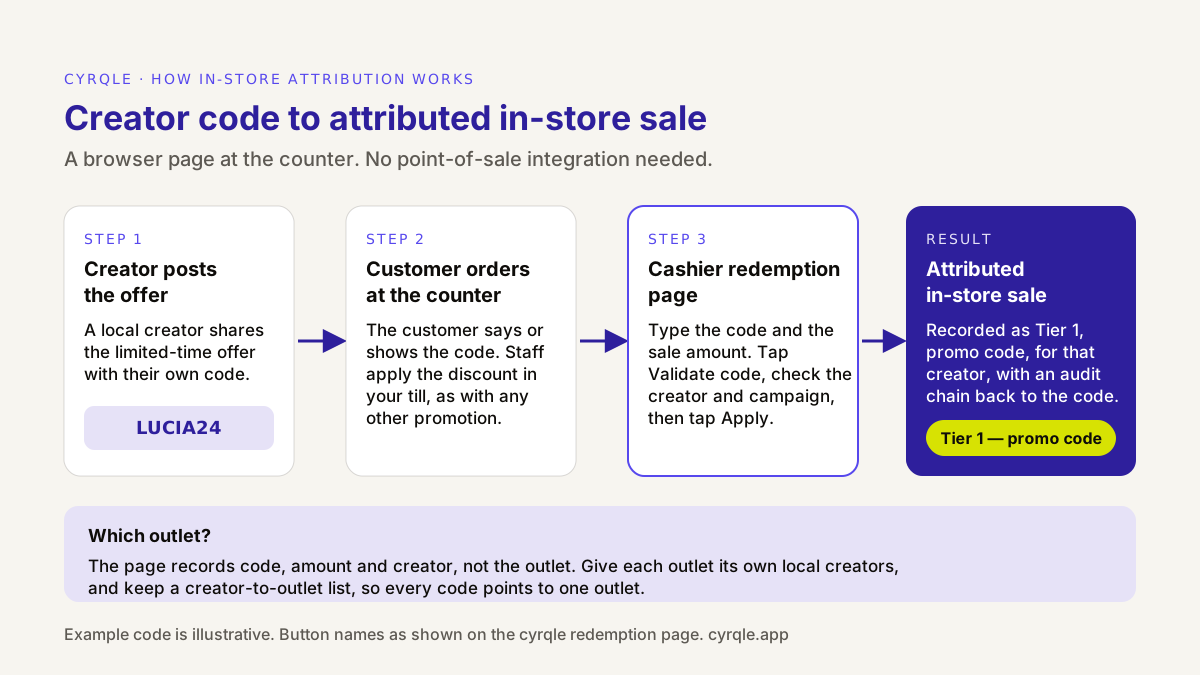
Two details make the data usable. First, the redemption page records the code, the amount and the creator. It does not ask which outlet the sale happened in. That is why Step 1 gives each outlet its own creators: the code tells you the creator, and the creator tells you the outlet. Second, the till still applies the discount. The redemption page records attribution; it does not replace your promotion setup, so enter the code and its end date in your till as usual.
In delivery apps: links for clicks, the app's report for orders
You cannot put your own tag inside a delivery app, so you cannot follow a click to an order there. Use two sources and keep them separate. A tracking link per creator that points to your outlet's page in the app tells you how many people each creator sent. The app's own promotion or marketing report tells you how many orders used the offer. Whether you can create a code with your own text in the app depends on the platform and your contract, so ask your account manager. If you can, use the same code text as the creator's promo code, so the totals are easy to match.
On your own site: link plus tag
If you take orders on your own website or app, a tracking link per creator plus an on-page tag on your ordering pages ties clicks to orders. This is the same setup an ecommerce brand uses, and it works alongside the code.
Step 5: Brief the restaurant teams before the first post
The counter process is a training task, not a technology task. If staff do not know the codes exist, they wave them through and the sale disappears from your results. Brief every outlet a few days before the first post.
- One-page staff sheet. The offer, the end date, the list of valid codes for that outlet, and the four steps of the redemption flow.
- The page on the counter device. Open the redemption page on the device staff will use, and save it to the home screen.
- A test redemption. Have each shift lead record one test sale during the briefing, so the first real one is not the first time.
- A rule for the rush. If the queue is long, staff write the code and amount on a slip and enter them after the rush. A late entry is better than no entry.
- A daily check. Someone at head office looks at redemptions per outlet each morning. An outlet at zero while its creators have posted usually means a process gap, not a weak creator.
Tell creators to say the code out loud in video and put it on screen as text. "Say LUCIA24 at the counter" is easier to remember than a caption at the end of a description.
Step 6: Read footfall through proxies
Codes undercount. Many people see a post, walk in and order without saying anything. You cannot measure those visits directly, so read them through proxies and present them as estimates.
- Redemptions per outlet. The cleanest signal. Compare outlets with each other and with the same LTO in a previous season.
- Test outlets against control outlets. Run creators around some outlets and not others, chosen to be similar in size, location type and recent sales. Compare the change in transactions in both groups over the same weeks. The difference is your best estimate of the lift the creators added. Our guide to a holdout test without a data team walks through the method.
- Google Business Profile actions. Each outlet's profile reports direction requests, call clicks and website clicks by day. A rise in direction requests around the creators' post dates, in test outlets and not in controls, is a useful sign of intent to visit.
- Delivery-app orders by outlet. Compare app orders in the test outlets with the controls, using the app's own reports.
None of these proves that a specific creator caused a specific visit. Together they tell you whether the campaign moved the outlets it was meant to move. For a full framework, see our guide on measuring creator ROI beyond the discount code.
Worked example: a two-week LTO across 12 outlets
A burger chain runs a two-week LTO for a new burger in 12 outlets in Valencia and Madrid. The code gives a free drink with the burger. All figures are illustrative, and the margins are assumptions.
Set-up
- 24 local creators, two per outlet, each with a promo code and a tracking link to the outlet's delivery-app page.
- Each creator gets a EUR 250 fee for one Reel and three Stories, plus four meal vouchers that cost the chain EUR 12 each in food: EUR 298 per creator, or EUR 7,152 in total.
- The free drink costs the chain EUR 0.60 per redemption.
Results after two weeks
| Channel | Attributed orders | Average ticket | Attributed revenue |
|---|---|---|---|
| Counter, codes on the redemption page | 1,150 | EUR 16.50 | EUR 18,975 |
| Delivery apps, from the apps' promotion reports | 310 | EUR 22.00 | EUR 6,820 |
| Own ordering site, link plus tag | 140 | EUR 19.00 | EUR 2,660 |
| Total | 1,600 | EUR 28,455 |
Reading it
- Total cost is EUR 7,152 for creators plus EUR 960 for 1,600 free drinks: EUR 8,112.
- Cost per attributed order is EUR 8,112 ÷ 1,600 = about EUR 5.07. Revenue ROAS is EUR 28,455 ÷ EUR 8,112 = about 3.5.
- Revenue is not profit. Assume a 65% contribution margin at the counter and on your own site, and 40% in delivery apps after the platform's commission. Contribution is (EUR 18,975 + EUR 2,660) × 0.65 + EUR 6,820 × 0.40 = about EUR 16,790. After the EUR 8,112 cost, the campaign leaves about EUR 8,680.
- The outlet view decides what you do next. Suppose the four Valencia outlets near the university produce 45% of the redemptions, and one Madrid outlet records nine. Before you drop that outlet's creators, check its daily redemptions: if the post dates show views but the counter shows zeros, retrain the team first.
The attributed numbers are a floor for what the codes saw, not a measure of lift. Some of these customers would have come anyway, and some customers came because of a post without saying the code. Compare the test outlets with matched control outlets to estimate the difference.
Labelling, minors and food advertising rules
Restaurant posts are advertising when you pay for them, in cash or in meals, and must be labelled clearly. In Spain, our guides to the AUTOCONTROL influencer code and to Real Decreto 444/2024 cover which labels work and which creators fall under the law.
Food and drink brands have one extra rule to watch. Article 46 of Spain's Ley 17/2011 de seguridad alimentaria y nutrición calls for codes of conduct for food and drink advertising aimed at children under 15. The co-regulation code for this is the PAOS code, which AESAN says covers online food and drink advertising aimed at under-15s. AESAN also lists a draft royal decree on food advertising aimed at children, so check the current status before a campaign. In practice: do not brief creators whose audience is mostly children, do not build the offer around child appeal, and check the rules in each market you run in. This section is not legal advice: for a specific campaign, ask your lawyer.
Mistakes that break a multi-location campaign
- One code for the whole chain. You learn which campaign worked, not which outlet or creator.
- Untrained counters. Unrecorded codes look exactly like weak creators. Check daily and fix the process first.
- No end date in the till. A code that keeps working after the offer ends blurs the results and costs margin.
- Measuring delivery apps on clicks alone. Clicks show interest. Use the app's report for orders.
- Calling attributed revenue "lift". It is the part of the result you can see. Use control outlets to estimate the rest.
How cyrqle helps
cyrqle runs a multi-location restaurant campaign in one workspace, from the shortlist to the outlet read-out. For the vertical overview, see creator marketing for QSR and fast food and creator marketing for restaurants.
- Find local creators. In Find creators, search by meaning across captions and visuals ("brunch spots in Ruzafa", "late-night food in Malasaña"), and look up a creator by handle, link or hashtag. Check each creator's engagement, posting cadence, content mix and past brand collaborations, then save one list per outlet in Lists.
- Run the campaign. In Campaigns, set the deal to Cash & product for fee plus vouchers, invite in bulk in Spanish or English, and use optional draft sign-off. The automated check covers the required hashtags and handles. Contracts are signed by both sides in the app as a Creator Collaboration Agreement.
- Attribute every channel. In Attribution, mint a promo code and a tracking link for every creator in bulk and export them as CSV for your tills and staff sheets. Staff record counter sales on the cashier redemption page, with no store integration needed, and each one counts as Tier 1 — promo code. Tracking links count clicks into delivery apps. For your own ordering site, the on-page tag (under 2KB) ties clicks to orders. Delivery-app orders from the apps' reports can be entered with Record offline-attributed sale, and the audit chain shows which operator recorded each one.
- Read the results. The Attribution tab shows sales, revenue and clicks by tier and top creators, with an audit chain from each sale to the code and creator. Map creators to outlets with your Step 1 list to get the outlet view.
What cyrqle does not do: it does not connect to delivery-app accounts, record which outlet a redemption happened in, or measure footfall and lift. Run the control-outlet comparison on your own data. To see the flow on a restaurant brief, book a 30-minute demo.
FAQ
How many creators does each restaurant outlet need?
Two or three local creators per outlet is a practical start. One creator makes the outlet's result depend on a single post. More than five for one outlet usually reaches the same local followers twice.
Do I need to integrate my point-of-sale system to track creator codes?
No. A cashier redemption page runs in a browser on a phone or tablet at the counter. Staff type the code and the amount, validate it and apply it. Your till still applies the discount as with any other promotion.
Can I track orders that come through Glovo, Uber Eats or Rappi?
Partly. A tracking link shows how many people each creator sent to your page in the app. The orders themselves appear in the app's own promotion report, which you then match to creators. You cannot follow a single click to a single app order.
How do I measure people who saw the post but did not use the code?
Not directly. Compare transactions in outlets with creators against similar outlets without them over the same weeks, and watch direction requests on each outlet's Google Business Profile. Treat the difference as an estimate of lift.
Should restaurants pay creators in meals only?
Only for small, local creators who already like the place, or for the opening of a new outlet. For a launch with fixed dates, a fee plus meal vouchers gets you the posts on the days you need them. Paid or gifted meals still mean the post must be labelled as advertising.
Sources
- Ley 17/2011, de 5 de julio, de seguridad alimentaria y nutrición, Article 46 (BOE): https://www.boe.es/buscar/act.php?id=BOE-A-2011-11604
- AESAN, Regulación de la publicidad de alimentos y bebidas dirigida a menores (Código PAOS): https://www.aesan.gob.es/nutricion/publicidad-alimentos-bebidas-menores
- Google Business Profile Performance API, DailyMetric (direction requests, call clicks, website clicks): https://developers.google.com/my-business/reference/performance/rest/v1/DailyMetric
Related material.
Influencer marketing by industry: the objective, compensation model, attribution surface, seasonal calendar and pitfalls for six verticals in Spain and Mexico.
Influencer marketing for beauty brands, step by step: seed 100 creators, move the ones who sell to hybrid deals, clear reuse rights, measure repeat purchase.
Justify your influencer marketing budget on one page: spend, attributed revenue as a range, MER, payback, holdout result and risks, with a worked euro example.