
Discount code vs tracking link vs pixel: which creator attribution method to use
Influencer discount code vs tracking link vs pixel: what each method sees and misses, how they overlap, and how to combine them into confidence tiers.
For influencer campaigns, use a discount code if you need the simplest proof that works everywhere, including the till. Use a tracking link with an on-page tag if you want to credit the buyers who click and pay full price. Use a pixel on your checkout so those link visits actually turn into recorded orders on a hosted checkout. For most ecommerce brands the right answer is not one method but all three, combined into confidence tiers.
The reason is that each method sees a different slice of the same buyers. A shopper in Sevilla types "MARTA15" because she saw it in a story. Another taps the link in a reel, browses for ten minutes and pays full price without a code. A third clicks on Sunday, rejects the cookie banner and buys from her laptop on payday. One campaign, three buyers, and no single method sees all of them.
This post compares the three methods on what they capture and what they miss, shows how their coverage overlaps in an illustrative campaign, and gives you a decision table by campaign type. For the ROI maths that sits on top of attribution, see how to measure influencer marketing ROI beyond the discount code.
What does each method actually measure?
Each method answers a different question. Mixing up those questions is where most creator reports go wrong.
- Discount code. "Did the buyer have this creator's code at checkout?" The store records the code on the order. That is promo-code attribution, and it is deterministic: the code is on the order or it is not.
- Tracking link with an on-page tag. "Did the buyer arrive from this creator's link, and did they buy?" The link carries an identifier. A small script on your store reads it, remembers the visit in a first-party cookie and ties it to a later order.
- Pixel. "Did a purchase happen on this checkout, and what did the browser know about the visitor?" A tracking pixel fires on checkout events. On its own it does not know which creator sent the buyer. It reports the order with whatever the link or the code left behind.
That last point is often missed in vendor comparisons. A pixel is the sensor at the till. The link and the code are the two ways a buyer can carry the creator's name to it.
Discount codes: what they see and what they miss
A per-creator code is the oldest method and still the strongest single piece of evidence. When an order carries "MARTA15", there is little doubt about what happened at checkout.
What a code captures
- Buyers on any device. The code travels in the buyer's head or screenshot. Phone in the morning, laptop at night, it does not matter.
- Buyers who never clicked. Stories, podcasts, live streams and video without clickable links all work with a code.
- In-store buyers. A cashier can enter the code at the till. That is the only one of the three methods that reaches a physical shop.
- Buyers who reject cookies. The code is part of the order, so your store's order data records it regardless of the consent banner.
What a code misses or overstates
- Full-price buyers. Anyone who clicks, browses and pays without typing the code is invisible. These are often your best customers, because they did not need the discount.
- Leakage. Codes often get copied onto coupon and voucher sites and browser extensions. A loyal customer who was going to buy anyway finds "MARTA15" on a coupon site and uses it. The creator gets credit, you give away margin, and the sale was not caused by the campaign.
- Cost. Every code sale is a discounted sale. A 15% code on a 55% gross margin product gives away more than a quarter of the margin on that order.
How to limit leakage
- Give every creator their own code. Shared campaign codes make leakage impossible to trace.
- Set a usage limit and an end date in your store's discount settings, so a leaked code dies with the campaign.
- Watch the redemption curve. Creator-driven demand usually peaks in the first days after a post and then decays. Steady redemptions weeks later, with no new post, usually mean the code is on a coupon site.
- Pay commission on codes with care. If you pay a creator a percentage of code sales, leaked redemptions cost you twice: the discount and the commission.
Tracking links: what they see and what they miss
A tracking link is a URL with an identifier added to it. When a buyer taps it, a tag on your store reads the identifier and stores it in a first-party cookie on your own domain. When the same browser places an order, the tag ties the order back to the click.
What a link captures
- Full-price buyers. No code needed. The buyer who clicked and paid without a discount gets counted.
- Same-session buyers. Click and buy in one visit: the strongest link evidence, and it does not depend on how long a cookie lasts.
- Later buyers on the same browser. If the cookie survives, a buyer who comes back within your attribution window is still tied to the click.
- Which post and which creator. One link per creator, or per post, tells you which piece of content drove the visit, not just which person.
What a link misses
- Buyers who reject cookies. In Spain, storing data on a visitor's device needs informed consent unless it is strictly necessary for a service the user asked for (LSSI, article 22.2). Your consent tool decides whether the tag may set its cookie. When a visitor rejects, the tag cannot remember the click, so a later purchase looks like a direct visit. This is not a flaw to work around; it is the law, and the gap belongs in your report.
- Device and browser switches. A click inside Instagram's or TikTok's in-app browser stores its cookie in that in-app browser. If the buyer later opens your site in Safari or on a laptop, the visit is new.
- Buyers who come back after the window. Choose the window before the campaign. Anything after it is outside the evidence.
- Buyers who never click. Stories without a link sticker, podcasts and offline mentions produce no click.
Why the tag weight matters
The tag runs on every page of your store, so its size is a real cost. A heavy script slows the pages that the creator's traffic lands on, which loses the very sales you are trying to measure. We wrote about why our attribution tag stays under 2KB, and about creator attribution without third-party cookies if you want the background.
Pixels: what they see and what they miss
On a store where you control every page, the on-page tag can record the purchase itself. On a hosted checkout, such as Shopify's, you cannot add your own script to the checkout pages. A checkout pixel fills that gap: it runs inside the checkout and reports events such as a completed purchase.
What a pixel captures
- Completed orders on your own checkout, with order value and line items, tied to the stored click when one exists.
- The return visit. If a buyer clicked a creator link earlier and the click was stored, the pixel ties today's order to it.
What a pixel misses
- Anything without a creator signal. A pixel does not know who referred the buyer. No stored click and no code means the pixel records a sale with no creator attached.
- Anything outside your store. Marketplaces, retail partners, physical shops and other sites you do not own are out of scope.
- Visitors whose consent settings block it. On Shopify you set which privacy permissions a custom pixel requires, and Shopify applies the visitor's consent choices to pixels (Shopify, pixel privacy). A visitor who declines can mean the pixel does not report.
That is why "pixel vs link" is a slightly false choice. On a hosted checkout, the pixel is how the link's evidence reaches the order.
Which method sees which buyer?
The matrix below puts the three methods side by side against the four kinds of buyer a creator campaign produces.
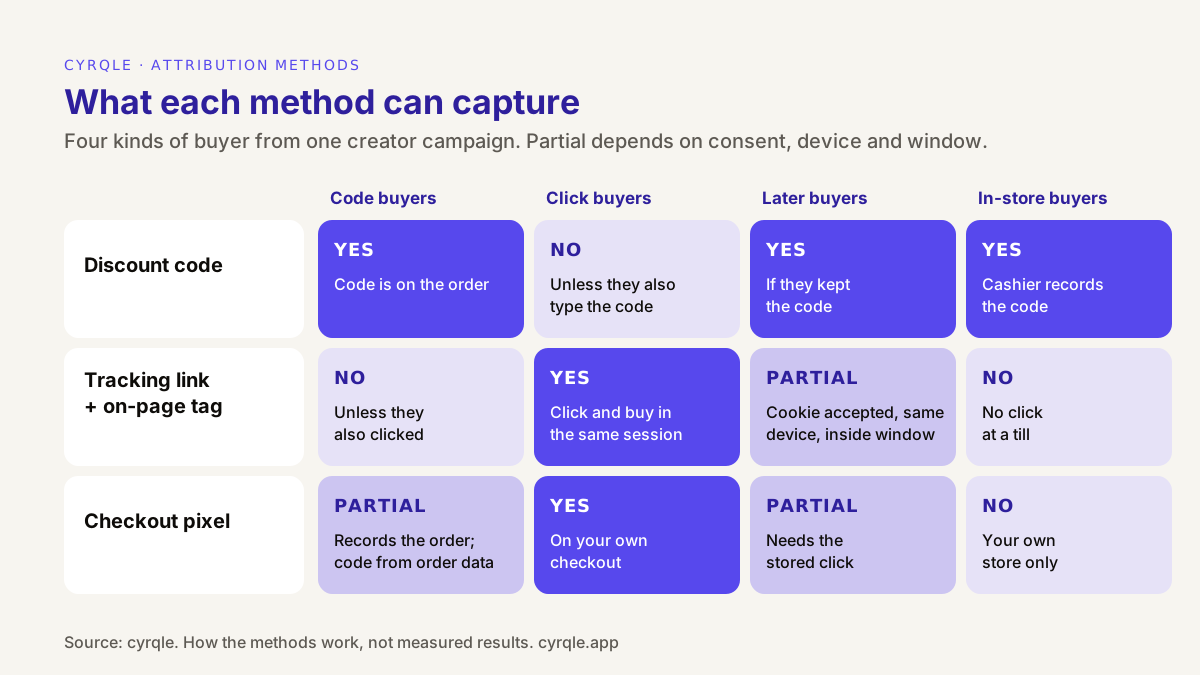
| Discount code | Tracking link + on-page tag | Checkout pixel | |
|---|---|---|---|
| Evidence | Code on the order | Click stored, then order on the same browser | Checkout event, linked to a stored click or a code |
| Buyers who type the code | Yes | No, unless they also clicked | Records the order; the code comes from order data |
| Buyers who click and pay full price | No | Yes | Yes, on your own checkout |
| Buyers who come back later | Yes, if they kept the code | Partial: same browser, cookie accepted, inside the window | Partial: same conditions as the link |
| In-store buyers | Yes, if the cashier records the code | No | No |
| Affected by cookie consent | No | Yes | Yes |
| Main failure | Leaks to coupon sites; misses full-price buyers | Lost to consent rejections and device switches | Knows nothing without a click or code |
| Cost to you | The discount on every sale | A script on your store; keep it light | Setup on the checkout |
How much do the methods overlap?
They overlap a lot, and that is the point of using all three. The same order can carry a code, a same-session click and a checkout pixel event at once. If you add up each method's total, you count that order three times.
Here is an illustrative campaign: eight creators, a Spanish skincare brand on Shopify, 400 orders with at least one creator signal. All figures in this section are illustrative.
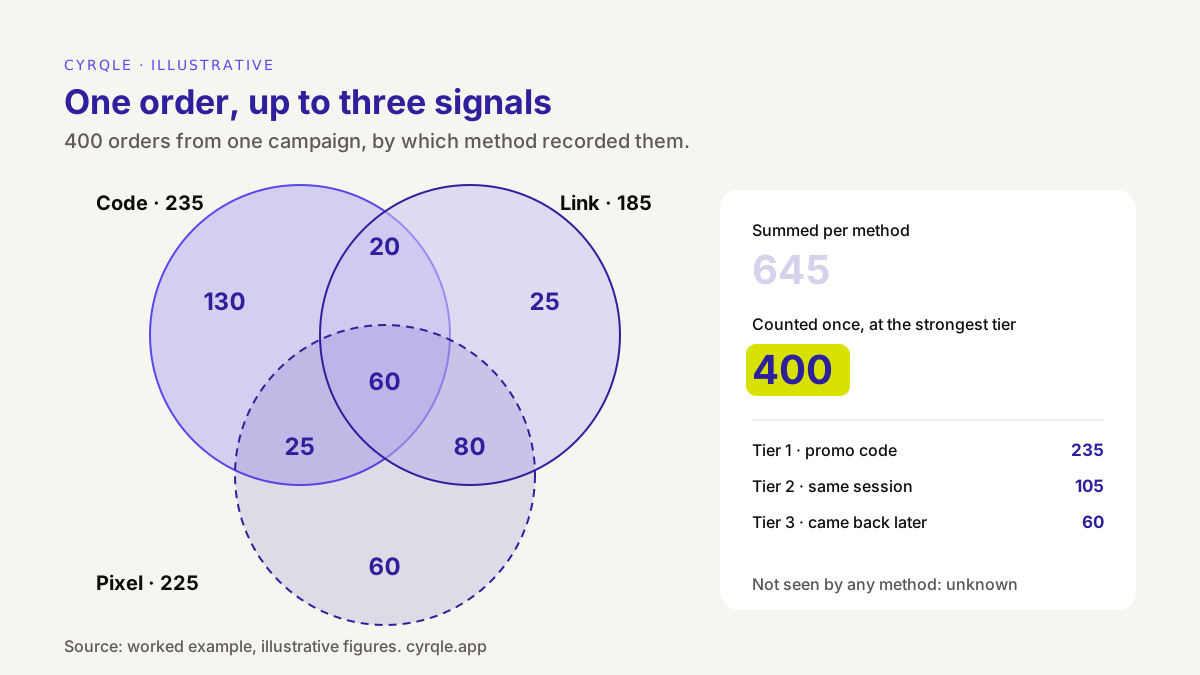
| Region of the diagram | Orders | What happened | Counted as |
|---|---|---|---|
| Code only | 130 | Typed the code, no click recorded. Includes coupon-site leakage | Tier 1: code |
| Code and link | 20 | Clicked and used the code; the checkout pixel did not report | Tier 1: code |
| Code and pixel | 25 | Clicked earlier, came back and used the code | Tier 1: code |
| All three | 60 | Clicked, used the code, checkout recorded | Tier 1: code |
| Link and pixel | 80 | Clicked and paid full price in the same session | Tier 2: same session |
| Link only | 25 | Same session; pixel did not report | Tier 2: same session |
| Pixel only | 60 | Clicked earlier, returned within 30 days, no code | Tier 3: came back later |
| Total, counted once | 400 |
Three things fall out of this table.
- Summing methods overstates. Code 235 + link 185 + pixel 225 = 645 "attributed orders". The true count is 400. A dashboard that adds sources together inflates the result by 61%.
- Code-only reporting understates. The code saw 235 of 400 orders, 59%. The 165 full-price and returning buyers are invisible to it. In revenue terms the gap is bigger, because those orders carry no discount.
- Some buyers no method sees. A buyer who rejected cookies, did not use the code and bought on another device is not in any circle. Your report should say that this group exists, even though you cannot count it.
Now check the code-only region. Suppose 40 of the 130 code-only redemptions arrived more than three weeks after the last post, at a steady rate, from returning customers. That pattern points to coupon-site leakage. Report those 40 inside Tier 1, but flag them, and do not pay commission on them without a look.
How do you combine them into confidence tiers?
Give every order one label: the strongest evidence it carries. Count it once, at that tier.
| Tier | Evidence | Strength | Use it for |
|---|---|---|---|
| Tier 1: promo code | The creator's code is on the order | Strongest. Deterministic, consent-proof, works in store | The floor of your result; the usual basis for commission |
| Tier 2: same session | Clicked the creator's link and bought in the same visit | Strong. Deterministic, but needs the tag or pixel to see it | The middle of your range |
| Tier 3: came back later | Clicked earlier, bought within the window on the same browser | Weaker. Other channels may have played a part | The ceiling; report it, label it, do not pay on it alone |
With the illustrative numbers: Tier 1 has 235 orders, Tier 2 has 105, Tier 3 has 60. Report the range, from Tier 1 alone to all three tiers, and choose the window before the campaign starts. The first-party creator attribution guide covers window choice in more detail, and judging creators on cohort value explains what to do with repeat purchases that land outside the window.
Which method should you use for your campaign?
Use the table as a starting point. In nearly every case the answer includes a code, because it is the only method that survives a rejected cookie banner and reaches the till.
| Campaign type | Minimum setup | Why |
|---|---|---|
| D2C store on Shopify, impulse or mid-price product | Code + link + checkout pixel + order webhooks | All three tiers; webhooks give you the server-side record and refunds |
| Store on WooCommerce or Magento | Code + link + on-page tag + order webhooks | The tag runs on your own checkout pages, so no separate pixel is needed |
| Considered purchase with a long decision cycle | Link + tag or pixel, plus a code | Tier 3 matters more; state the window clearly |
| Restaurants, shops, events with a box office | Code, recorded at the till | Links and pixels cannot see a physical sale |
| Stories, podcasts, live streams without links | Code | No click to track |
| Awareness campaign with no sales goal | Link for traffic; no code | A discount trains the audience to wait for one |
| Sales on a marketplace you do not control | None of the three, reliably | Record those sales by hand and label them |
For a D2C brand on Shopify, the creator commerce setup for D2C brands shows how the pieces fit together.
How cyrqle helps
cyrqle uses all three methods and gives every order one confidence tier. In Attribution:
- Per-creator promo codes and tracking links. Mint them in bulk for a campaign and export them. On Shopify, cyrqle can also create the matching discount in your store, if you paste an Admin API token and set a percentage. This is opt-in.
- An on-page tag under 2KB on your own store ties link clicks to orders.
- A Shopify Web Pixel (a custom pixel, pre-filled for your workspace) covers Shopify's hosted checkout. See the Shopify integration for what is included and what is not: there is no App Store app, and setup is a pasted pixel plus webhooks.
- Signed order webhooks from Shopify, WooCommerce and Magento are the server-side record of each sale, including the code used. Attributed revenue is shown net of refunds.
- A cashier redemption page lets shop staff record a creator code at the till without any store integration.
- Confidence tiers with the same labels as this post: Tier 1 — promo code, Tier 2 — same-session and Tier 3 — cookied later, with a 30-day window. Each order counts once, at its strongest tier. The Attribution tab shows sales, revenue and clicks by tier, top creators, and an audit chain from each sale to the post, code, creator and operator.
What cyrqle does not do: no QR-code attribution, no multi-touch attribution and no incrementality measurement. The tiers tell you how strong the link between a sale and a creator is, not whether the sale would have happened anyway. Consent is still yours to manage: the tag and pixel follow your consent setup, so expect fewer link-attributed orders where visitors reject cookies. To see the tiers on your own category, book a 30-minute demo.
FAQ
Is a discount code or a tracking link better for influencer marketing?
Neither on its own. A code is stronger evidence and works in store, but misses buyers who pay full price. A link catches those buyers but loses anyone who rejects cookies or switches device. Use both, and count each order once at its strongest evidence.
Do I still need a pixel if I use tracking links?
On a hosted checkout such as Shopify's, yes. Your on-page tag cannot run on the checkout pages, so a checkout pixel is how a stored click turns into a recorded order. On a store where you control the checkout pages, the on-page tag can do the job.
How do I stop creator codes leaking to coupon sites?
You cannot stop it fully. Give each creator their own code, set a usage limit and an end date, and watch for redemptions that continue weeks after the last post. Flag those orders and think twice before paying commission on them.
Do cookie banners affect creator attribution?
Yes, for links and pixels. If a visitor rejects the cookies your tag needs, a later purchase cannot be tied to the click. Codes are not affected, because the code is recorded on the order itself.
Can I attribute in-store sales to a creator?
Only with a code. Ask the cashier to record the creator's code at the till. Links and pixels cannot see a sale that happens in a physical shop.
What attribution window should I use?
Choose it before the campaign and state it in every report. Thirty days after the click is a common default for considered purchases. Use a shorter window for impulse products, and report repeat purchases separately instead of stretching the window.
Sources
- Ley 34/2002, de servicios de la sociedad de la información y de comercio electrónico (LSSI), article 22.2, consent for storing data on user devices: https://www.boe.es/buscar/act.php?id=BOE-A-2002-13758
- Shopify developer documentation, Web Pixels API, pixel privacy: https://shopify.dev/docs/api/web-pixels-api/pixel-privacy
Related field notes.
TikTok Shop vs Shopify for creator sales in Spain: in-app conversion against customer data, margin, returns and attribution, with a worked example in euros.
How to tell whether the creator content on your site is earning its place. The metrics that matter at each step, from wall impressions to product clicks to attributed orders, and the traps that make the numbers look better or worse than they are.
Returns-adjusted ROAS for fashion creator campaigns: gross vs net ROAS per creator with worked numbers, why commission waits for returns, and who changes rank.