
Influencer software for agencies: multi-client workspaces, white-label reports and margin
What influencer marketing software for agencies must do that brand tools skip: client separation, Act-As, per-client fees and white-label reports. Checklist.
Influencer marketing software for agencies is a platform that lets one team run creator campaigns for many brands at once, without mixing their data. It separates each client's campaigns, creators, contracts and reports. It lets you control which team member can act for which client. And it produces client reports under your name, with your fees handled the way your contract says. A tool that only does discovery and outreach well is a brand tool, even if it sells an "agency plan".
Picture a 12-person agency in Madrid with a sportswear brand, a skincare brand and a restaurant group on its books. Each client wants its own creators, its own approval flow and a monthly report that looks like the agency made it. The agency wants one place to work, one login per person, and a clear picture of what each client is worth. This guide covers what the software must do for that agency, gives you a checklist for demos, and works through a margin model with illustrative numbers.
For the general version of this decision, the brand-side view, start with our 12-point checklist for choosing an influencer marketing platform. This post covers only what is different for agencies.
What does an agency need that a brand does not?
A brand runs one P&L. An agency runs one P&L per client, plus its own. So it needs every brand feature, and the software must also respect the boundaries between clients and between the agency and each client.
| Brand team | Agency | |
|---|---|---|
| Workspaces | One brand, maybe several markets | One workspace per client, plus the agency's own |
| Data separation | Internal only | Hard boundary: client A never sees client B's creators, fees or results |
| Access control | Roles inside one team | Roles per client: a person can edit one client and only read another |
| Working for someone else | Not needed | Act on behalf of the client, with every edit logged under the agency |
| Commercial terms | Creator fees only | Creator fees plus the agency fee or markup, set per client |
| Reports | Internal dashboards | Client-ready reports in the agency's name, with control over which fees show |
| Onboarding a new account | Once | Every time you win a client, sometimes before the client has an account |
| Offboarding | Rare | When a client leaves, access ends and the client keeps its data |
Most platforms handle the first column well. The second column is where agency projects fail, usually three months in, when the second and third clients arrive.
1. Client separation: can one client ever see another's data?
The answer must be no, and the boundary must sit in the software, not in your team's discipline. Each client needs its own workspace with its own campaigns, creator lists, contracts, content and reports. A shared database with a "client" column you filter on is not enough. Sooner or later, someone exports the wrong list.
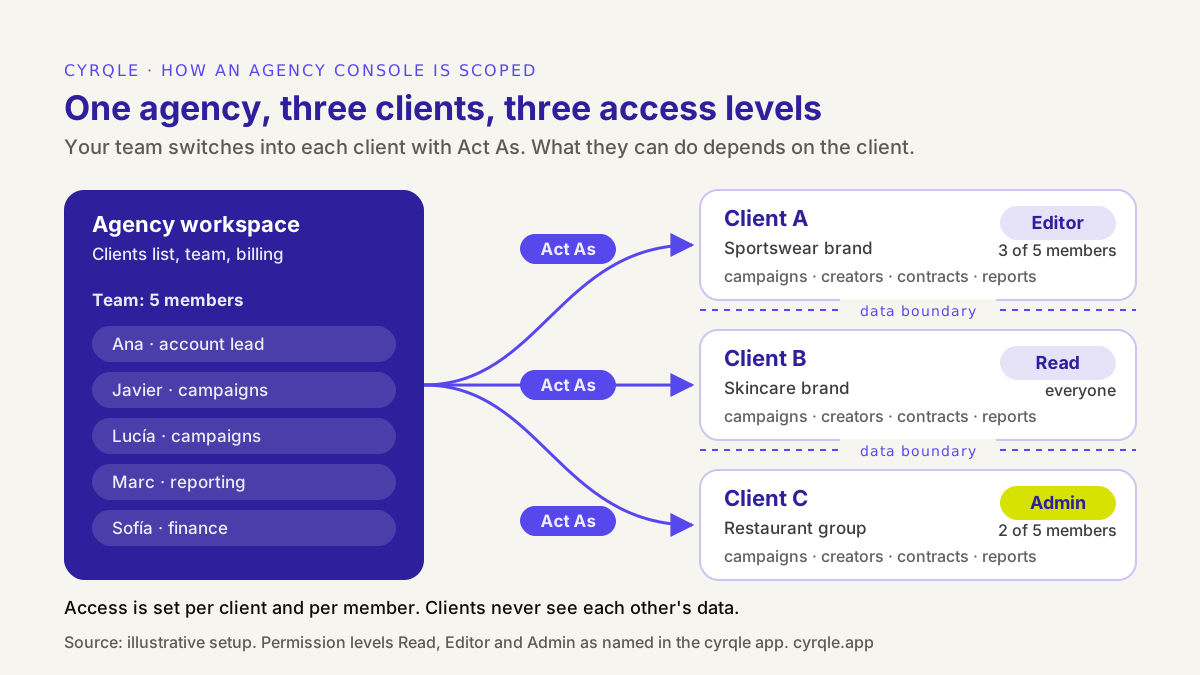
Separation matters for three reasons:
- Confidentiality. Clients in the same category often compete. A skincare client should not see which creators another beauty client pays, or at what rate.
- Data protection. When you run campaigns for a client, you handle creator personal data on the client's behalf. Under the GDPR, a processor needs a written contract with the controller (Article 28 of Regulation (EU) 2016/679). Clean separation in the tool makes that contract much easier to keep. This is not legal advice: whether you are a processor or a joint controller depends on your contract, so ask your lawyer.
- Offboarding. When a client leaves, you remove the agency's access and the client keeps its workspace and history. If the data lived in the agency's account, the handover becomes an export project.
Test it in a demo: ask the vendor to create two client workspaces, add the same creator to both with different fees, and show you what each client sees.
2. Per-member access: who on your team can act for which client?
Agencies staff clients, not tools. Javier runs the sportswear account, Lucía the skincare one, and Marc builds every monthly report. The software must reflect that.
Look for two layers:
- A permission level per client. For example, read-only for a client in a pitch phase, editor for active campaigns, admin where the agency also manages the client's team and billing.
- A member list per client. By default the whole agency can work on a client. For sensitive accounts, you limit it to the named people.
The test question is simple: "Can one person have editor access to client A and no access to client C?" If the answer involves creating a second account for that person, the tool was not built for agencies.
3. Acting on behalf of a client: why shared logins fail
Agencies spend most of their day inside a client's account: drafting briefs, inviting creators, approving drafts. There are two ways a tool can support that.
| Shared client login | Act on behalf of the client ("Act-As") | |
|---|---|---|
| How it works | The agency signs in with credentials the client gave it | Each agency member signs in once, then switches into the client workspace |
| Audit trail | Every action looks like the client did it | Every action is logged under the named agency member |
| Leavers | Rotate the client's password and tell everyone | Remove one person from the agency |
| Many clients | One password per client, often in a spreadsheet | One login, a list of clients |
| Client revokes access | Change the password and hope | End the link; the agency loses access at once |
The audit trail is the point. When a creator disputes a fee or a client asks who approved a post, you need to answer with a name and a timestamp, not "someone at the agency".
4. Per-client terms and fees: where your margin is recorded
An agency earns in one of a few ways: a retainer, a management fee as a percentage of creator spend, a markup on creator fees, or a performance component. The agency pricing guide listed under "More in this series" compares them. Whatever model you use, the software has to hold it per client, because no two clients sign the same terms.
Three things to check:
- Can you set the agency fee per client? A 15% management fee for one client and a fixed retainer for another should not need a spreadsheet next to the tool.
- Does each creator payout show the split? Creator net, platform commission, agency fee and any tax withheld, on one statement. That is what your finance team reconciles at month end.
- Who holds the money? If the client funds campaigns and creators are paid through the platform, check where the agency fee is paid out and in which currency. For the tax side of paying creators in Spain, see how to pay influencers in Spain.
Contracts sit here too. Each client may want its own brand terms attached to the creator agreement. Our influencer contract template for Spain and the EU explains each clause.
5. White-label reports, and when to hide creator fees
The monthly report is the deliverable most clients actually read, and it is where agencies lose the most hours. Two requirements separate agency reporting from brand reporting.
White-label output. The report goes to the client as the agency's work. In the wider industry, white-label can mean a whole platform rebranded on the agency's domain. For most agencies, branded reports are what matters. Check exactly what the vendor means: report branding only, or a rebranded login and domain too.
Control over which fees show. Some agency contracts are fully transparent: the client sees each creator fee and the agency fee on top. Others are net: the client pays one price per deliverable and the agency's margin is not itemised. The software should support both. It should let you hide creator fees on client-facing reports while your internal payout view still shows the full amount.
A word of caution. Hiding fees is a commercial choice, and your contract with the client decides it. If your agreement promises cost transparency or audit rights, hidden fees on a report do not change that obligation. Agree on it in writing before the first campaign.
Before you judge any report, decide what goes in it. A report that only shows reach and engagement will not survive a budget review. Our guide to measuring influencer marketing ROI beyond the discount code covers which numbers to put in front of the client.
The agency checklist: 12 questions for every demo
Use this alongside the brand-side checklist. Ask the vendor to show each item live, in a demo account with at least two clients.
| # | Question | What a good answer looks like |
|---|---|---|
| 1 | How are clients separated? | One workspace per client; nothing shared by default |
| 2 | Can I set up a client before they have an account? | Yes, as a managed workspace the client can claim later |
| 3 | Can I link to a client that already uses the tool? | Yes, by request; the client approves and picks the access level |
| 4 | Can access differ per client and per team member? | Yes, both, without duplicate accounts |
| 5 | How does my team work inside a client account? | Switch in with one login; no shared passwords |
| 6 | Is every action logged under the person who did it? | Yes, including actions taken on behalf of the client |
| 7 | Can I set different fees for different clients? | Yes, and the fee shows on each payout statement |
| 8 | Can I hide creator fees from client-facing reports? | Yes, per campaign or per creator, with full fees kept internally |
| 9 | What reports can I send under my name? | Campaign, brand and creator reports, as PDF and CSV |
| 10 | Can I import my existing creator roster? | Yes, by handle or link list, matched to the creator index |
| 11 | What happens when a client leaves? | Access ends; the client keeps its workspace and history |
| 12 | How is pricing structured for many clients? | A written quote that states what scales with each new client |
Discovery quality still matters, because your team searches for creators for every brief. If your current tool is a keyword filter over a database, read why audience clusters beat keyword search before you shortlist.
A margin model: where the agency hours go
Software pays for itself in an agency through hours, not features. So build the case on your own time sheets. Here is an illustrative model for one campaign with 10 creators.
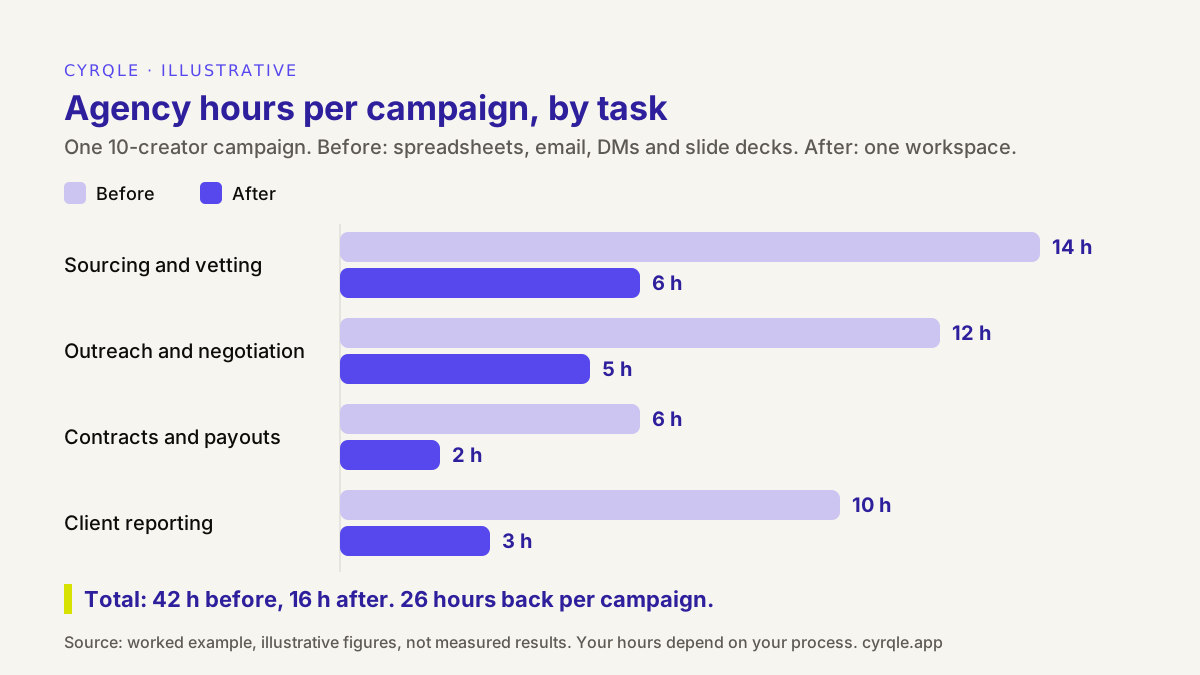
Step 1: time the four heavy tasks
| Task | Before (spreadsheets, email, DMs, decks) | After (one workspace) | Where the time goes |
|---|---|---|---|
| Sourcing and vetting | 14 h | 6 h | Searching, checking engagement and past brand deals, building the shortlist |
| Outreach and negotiation | 12 h | 5 h | First contact, follow-ups, rate talks, tracking who answered |
| Contracts and payouts | 6 h | 2 h | Sending agreements, chasing signatures, checking deliverables before payment |
| Client reporting | 10 h | 3 h | Collecting post stats, screenshots, building the deck |
| Total | 42 h | 16 h | 26 h saved per campaign |
All figures are illustrative. Your numbers will differ by category, creator tier and how much your current process already uses templates.
Step 2: turn hours into margin
Assume, again for illustration, a management fee of EUR 4,000 per campaign and a fully loaded team cost of EUR 40 per hour.
| Before | After | |
|---|---|---|
| Management fee per campaign | EUR 4,000 | EUR 4,000 |
| Team hours | 42 | 16 |
| Team cost at EUR 40/h | EUR 1,680 | EUR 640 |
| Contribution before software cost | EUR 2,320 (58%) | EUR 3,360 (84%) |
At four campaigns a month, that is 104 freed hours, or EUR 4,160 of team time a month.
Step 3: be honest about what counts
Freed hours become margin in only two ways:
- You sell them. At 16 hours per campaign, 104 hours is capacity for about six more campaigns with the same team.
- You need fewer of them. You hire later, or you use fewer freelancers in peak months.
If neither happens, the hours turn into slack, and the software is a cost. So the break-even test is: monthly software cost must be lower than the value of the hours you will actually redeploy. Get a written quote, put it in the model, and run it with your own time sheets. To put a revenue number on the client side of the case, the creator ROI calculator estimates attributed revenue and ROAS for a campaign.
How cyrqle helps
cyrqle has a dedicated agency workspace. The pieces map to this guide as follows. The agency overview shows them in one place.
- Clients. The Clients list holds every brand you manage. Create a managed brand for a client who has no account yet, and send them an invitation to claim it later. Or request access to a brand that already uses cyrqle; the brand owner accepts or declines and chooses the level.
- Per-client access. Each client link has a permission level, Read, Editor or Admin. You can open a client to the whole agency or limit it to named team members.
- Act As. Switch into a client workspace from the Clients list. The app shows "acting as" the client "via" your agency, with your access level. How individual actions are logged is worth asking about in the demo.
- Per-client terms and fees. Set commercial terms and fees per client. Each creator payout shows the split: creator net, cyrqle commission, agency fee and tax withheld, with a statement per payout. Creators in Europe and the US are paid to their bank through Stripe Connect, in EUR; elsewhere the brand pays by bank transfer and records it. See compensation and contracts.
- White-label reports. In reports, generate the Brand performance, Campaign report, Creator media kit, Creator list report and Cluster report for any client, as PDF or CSV. These are white-label reports, not a rebranded login or domain. Turn on "Hide creator fees from client reports" for a whole campaign or for one creator; your internal payout view still shows the full fee.
- The work itself. Inside each client, the brief, invites, contracts, drafts, posts and payouts run in campaigns. Running a creator campaign end to end walks through the stages, and moving an existing roster out of a spreadsheet covers bringing your current creators in.
Two honest limits. Agency pricing is not public: it is a custom monthly base plus usage, so ask for a quote on the pricing page. And the 42-to-16-hour model above is illustrative, not a measured cyrqle result. If you want to see the Clients list, Act As and a white-label report on a category close to yours, book a 30-minute demo.
More in this series
These guides go deeper on agency operations:
- White-label influencer reporting: what to demand from a vendor
- How agencies price influencer services: retainer, percentage or performance
- Influencer campaign report template for agency clients
- Prove creator ROI to a sceptical client in 30 days
- How to manage client brands in cyrqle as an agency
- Creator campaign proposal template for agencies
- Running 100 creators without a spreadsheet
- Paying creators on behalf of clients
FAQ
What is the difference between influencer software for agencies and for brands?
Agency software adds a layer above the brand workspace. It separates clients, sets access per client and per team member, lets the agency act on a client's behalf with an audit trail, and records per-client fees. Brand software assumes one team and one P&L.
Do agencies need a separate account for every client?
Each client needs its own workspace. Your team does not need a separate login for each one. In a tool built for agencies, each person signs in once and switches between clients, and the tool controls which clients they can enter.
Is it acceptable to hide creator fees from a client?
It depends on your contract with the client. Net pricing, where the client pays one price and the agency margin is not itemised, is common. But if your agreement promises cost transparency, a report setting does not override it. Agree on it in writing first.
What does white-label mean in influencer software?
It usually means the client sees the agency's name on what it receives. Some vendors only brand the reports. Others rebrand the whole login and domain. Ask the vendor which one it offers, and check a sample report before you sign.
How do I calculate whether agency software pays for itself?
Time your team's hours on sourcing, outreach, contracts and reporting for one real campaign. Estimate the hours with the tool, and value the difference at your loaded hourly cost. The software pays for itself only when the hours you will actually redeploy are worth more than its monthly cost.
Related field notes.
How to manage an influencer ambassador program at scale: clusters, bulk invites by market and language, two follow-ups, your-move buckets and pay on delivery.
An influencer campaign compliance checklist for agencies: the six records to keep for every post, from signed contract to payout, and how to audit them fast.
15 questions to ask an influencer marketing platform in a demo: data, attribution, payouts, rights, security and exit, with red-flag answers and good ones.