
White-label influencer reporting: what an agency should demand from a vendor
White label influencer reporting for agencies: branding depth, hidden creator fees, vendor labour, per-client pricing and exports. 10 questions for any demo.
White-label influencer reporting is a set of client reports that go out under your agency's name, show the client's campaigns and creators, and leave out anything your contract keeps private, such as creator fees or the vendor behind the tool. When you assess a vendor, check five things: how deep the branding goes, whether vendor staff build the reports, how creator fees are hidden, how the price changes as you add clients, and what you can export.
Picture an agency in Valencia with a sportswear brand, a skincare brand and a restaurant group on its books. On the first working day of each month, someone exports three reports, opens each one, and checks four things before sending: is our name on it, is the vendor's name on it, can the client see what we paid the creators, and do the numbers match last month's deck? A good reporting tool turns that into a ten-minute check. A weak one turns it into a day of copy-paste into slides.
This checklist comes from the places where agency reporting usually goes wrong. For the wider agency software decision (client workspaces, access, margin), start with our guide to influencer software for agencies. This post goes deep on the report itself.
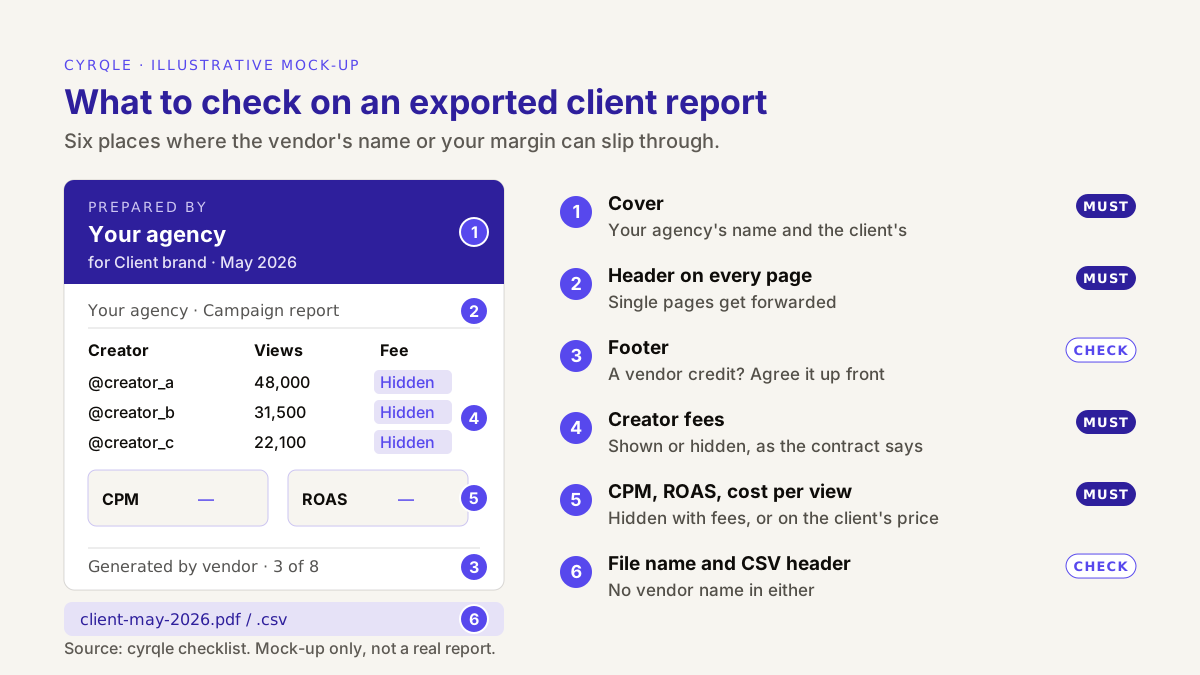
What does "white-label" actually cover in an influencer report?
"White-label" has no fixed meaning. One vendor uses it for a report with your logo on the cover. Another uses it for a whole platform that runs on your domain, sends email from your address and never shows its own name. Both are honest uses of the word, so the first job in a demo is to find out which level the vendor means.
| Level | What the client sees | Typical use |
|---|---|---|
| 0. Vendor-branded | The vendor's name and logo on the cover and on every page | Internal reports only |
| 1. Agency-named | Your agency's name on the cover and headers; a small vendor credit may stay in the footer | Most monthly client reports |
| 2. Fully branded report | Your logo and colours; no vendor name anywhere in the file | Agencies that resell reporting as their own product |
| 3. Rebranded platform | Your domain, your login page, your email sender, your logo inside the app | Agencies that give clients a login to the tool |
Most agencies need level 1 or 2 for files, and only need level 3 if clients log in themselves. Do not pay for level 3 if your clients only ever see a PDF. Do not accept level 0 if the report is your main deliverable.
The definition of white-label in our glossary covers the wider meaning. For a reporting purchase, the narrow question is enough: what exactly is on the file you send?
1. Branding depth: which parts of the report must carry your name?
A report has more branded surfaces than the cover. Check each of these on a real export, in both PDF and CSV, before you sign.
- Cover. Your agency's name, the client's name, the reporting period. "Prepared by [agency] for [client]" is the clearest form.
- Running header on every page. Clients forward single pages. A page with no name on it gets credited to whoever forwarded it.
- Footer. This is where vendor marks hide. Decide in advance whether a small "generated by" credit is acceptable. Many clients do not care; some procurement teams do.
- File name. A file called after the vendor tells the client which tool you use before they open it.
- CSV header rows. CSV exports often start with a comment line naming the tool. Check whether your client's analysts will see it.
- Share links and email senders. If the vendor sends reports by link or email, check the domain on the link and the sender address.
- Chart labels and metric names. Vendor-specific metric names ("Index Score", "Impact Value") make the report look like the vendor's. Prefer standard terms the client can look up: views, engagement rate, CPM, attributed revenue.
What white-label must not hide
White-label hides the vendor from the report. It must not hide the vendor from the data-protection paperwork. When you run campaigns for a client, you usually handle creator personal data on the client's behalf, and the reporting tool processes that data too. Under Article 28(2) of the GDPR, a processor "shall not engage another processor without prior specific or general written authorisation of the controller" (Regulation (EU) 2016/679). So the tool should appear in the sub-processor list you share with the client, even if its name never appears on a report. This is not legal advice: your role (processor or joint controller) depends on your contract, so ask your lawyer.
2. Hidden vendor labour: who actually builds the report?
Some reporting offers are partly services. The vendor's account team assembles the monthly deck, writes the commentary, or fixes the data by hand. That can be useful, but it changes three things you need to know before you sign.
- Who touches client data. If vendor staff build the report, they have access to your client's creators, fees and results. That access belongs in your data-protection contract and in the sub-processor list above.
- What happens when the plan changes. If the report quality depends on a person at the vendor, it drops when that person leaves or when you move to a cheaper plan. Ask for a report generated by the software alone, with no manual work, and judge that.
- Turnaround. A report someone at the vendor builds arrives when they have time. A report the software builds arrives when you press export. For month-end, that difference is the whole point.
The demo question is simple: "Show me this report generated live, from this account, now." If the vendor needs a few days to send a sample, the report is a service, not a feature.
3. Fee visibility: can you hide creator fees without leaking them?
Agency contracts with clients come in two shapes. In a transparent contract, the client sees each creator fee and pays the agency fee on top. In a net contract, the client pays one price per deliverable or per campaign, and the agency's margin is not itemised. Your reporting tool has to support both, per client and ideally per campaign.
Hiding the fee column is the easy part. The hard part is that several standard metrics are built from spend, so they reveal it.
| Metric in the report | Built from | Reveals what you paid? |
|---|---|---|
| Creator fee, amount paid | Spend directly | Yes |
| CPM (cost per 1,000 views) | Spend ÷ views | Yes: views × CPM ÷ 1,000 = spend |
| Cost per engagement, cost per view | Spend ÷ engagements or views | Yes |
| ROAS | Revenue ÷ spend | Yes: revenue ÷ ROAS = spend |
| Views, engagement rate, posts delivered | Platform data | No |
| Attributed orders and revenue | Your store data | No |
A worked example: how a hidden fee leaks
All figures are illustrative. An agency runs a six-creator campaign. It pays the creators EUR 9,000 in total and bills the client EUR 12,000 on a net contract. The campaign gets 600,000 views and EUR 30,000 of attributed revenue.
The agency hides the fee column, but the report still shows a CPM of EUR 15 and a ROAS of 3.3x. The client multiplies 600,000 views by EUR 15 and divides by 1,000: EUR 9,000. Or it divides EUR 30,000 by 3.3: about EUR 9,000. Either way, it now knows the agency's margin is EUR 3,000.
There are two clean fixes:
- Hide every metric built from spend whenever fees are hidden. The client still sees views, engagement and attributed revenue.
- Calculate cost metrics on the client's price. On EUR 12,000, the CPM is EUR 20 and the ROAS is 2.5x. That is also the more honest ROAS for the client, because EUR 12,000 is what the campaign cost them.
Our guide to measuring influencer marketing ROI beyond the discount code explains why the full cost, not only the creator fee, belongs in the ROI calculation.
Hiding fees is a commercial choice, and your contract decides it. If the client contract promises cost transparency or audit rights, a hidden column on a report does not change that obligation.
4. Pricing basis: what happens to the bill at client ten?
Reporting is rarely priced on its own. It comes inside a platform plan, and the way that plan scales decides whether white-label reporting stays profitable as you grow. Ask which unit drives the price.
| Pricing unit | 3 clients (illustrative) | 10 clients (illustrative) | Risk for an agency |
|---|---|---|---|
| Per client workspace, EUR 300 per client per month | EUR 900 | EUR 3,000 | Cost grows in a straight line with every client you win |
| Per seat, EUR 100 per user, 6 users then 12 | EUR 600 | EUR 1,200 | Freelancers and client logins can count as seats |
| Per report, EUR 20 per PDF, 4 reports per client per month | EUR 240 | EUR 800 | Teams export less often to save money, and clients get fewer updates |
| Flat base plus usage | Quoted | Quoted | Ask what counts as usage before you sign |
The prices in this table are invented to show how each unit scales. They are not any vendor's prices. Check the current price on each vendor's own site or quote.
Three questions settle most of this: what is the unit, what does client number ten cost compared with client number three, and is white-label reporting in the plan or an add-on? Our post on influencer marketing platform pricing and hidden costs covers the full cost worksheet.
5. Exports: which formats does an agency actually need?
You need two formats, for two readers.
- PDF for the client. A fixed document that you can send, file and quote from. It is a snapshot of the data at the moment you export, so put the export date and the reporting period on the cover.
- CSV for your own team. Raw rows that you can drop into your own deck template, a client's BI tool or a finance reconciliation. Check that hidden fees are hidden in the CSV too, not only in the PDF. A CSV with a fee column is the easiest leak of all.
Then check four details that cause most month-end rework:
- Language. If you report to a Spanish client and its Mexican subsidiary, can you export the same report in Spanish and in English?
- Date range. Can you set the period, or is it fixed to "last 30 days"? Monthly reports need calendar months.
- Snapshots that are not time-based. A creator shortlist or roster is a list of who is in it today. A good tool says "as of" a date instead of printing a period that does not filter anything.
- Report types. Most agencies need a campaign report, a brand rollup across campaigns, a creator profile or media kit for approvals, and a shortlist report for pitches.
6. Live numbers: where should revenue and ROAS live?
Revenue changes after the report goes out. Refunds arrive, buyers who clicked last week come back and buy, a late order webhook lands. So a PDF sent on the 1st is already slightly wrong on the 5th. That is acceptable if everyone knows it.
Set two rules with the client. First, the PDF is the record of the month: it states the export date, the attribution window and how sure you are of each euro. Second, the live figure lives in the tool's attribution view, and any change after the PDF is reported in the next one, not edited in silence. Promo-code sales are the most certain, same-session link sales come next, and sales from buyers who return later are the least certain. Showing them as separate tiers stops one number from carrying claims it cannot support. Our guide to first-party creator attribution covers the tracking surfaces behind those tiers.
The vendor demo checklist: 10 questions
Ask the vendor to answer each question live, in a demo account with at least two clients. A screenshot in a slide deck is not an answer.
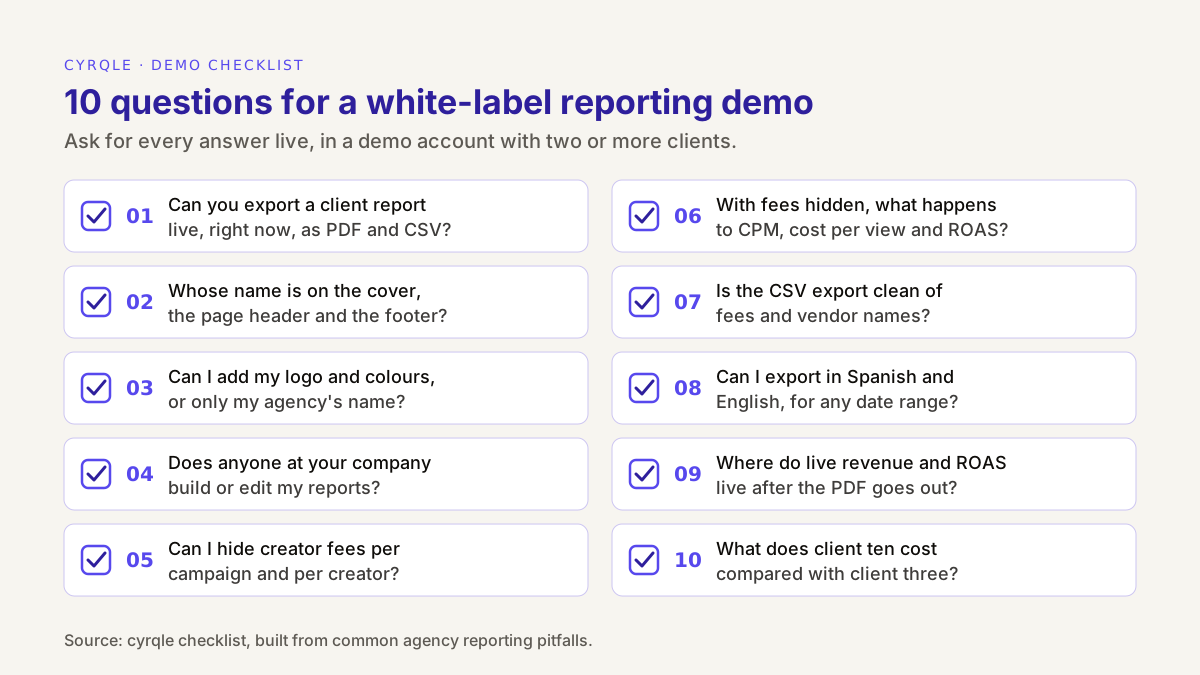
| # | Question | Good answer | Red flag |
|---|---|---|---|
| 1 | Can you export a client report live, now? | A PDF and a CSV in under a minute | "We will send a sample after the call" |
| 2 | Whose name is on the cover, header and footer? | Yours, with any vendor credit shown to you up front | You find the vendor logo yourself, on page 4 |
| 3 | Can I add my logo and colours, or only my name? | A clear yes or no, with a sample | "It is on the roadmap", with no date |
| 4 | Does any person at your company build or edit my reports? | No, or yes, written into the contract and the price | Vague answers about "your success team" |
| 5 | Can I hide creator fees per campaign and per creator? | Yes, both, with full fees kept in the internal view | Only by deleting the column in a spreadsheet |
| 6 | When fees are hidden, what happens to CPM and ROAS? | Hidden too, or calculated on the client's price | Still shown, built from the hidden fee |
| 7 | Is the CSV export clean of fees and vendor names? | Same rules as the PDF | Fees appear in the CSV |
| 8 | Can I export in Spanish and English, for any date range? | Both languages, any period | One language, fixed periods |
| 9 | Where do live revenue and ROAS live after the PDF goes out? | A live attribution view, with confidence tiers | Revenue only inside the PDF, with no tiers |
| 10 | What does client ten cost compared with client three? | A written quote that names the pricing unit | "Let's discuss when you get there" |
For the questions to ask about the rest of the platform (discovery, contracts, payouts, attribution), use our 12-point checklist for choosing an influencer marketing platform.
How cyrqle helps
In Reports, cyrqle generates five reports: Brand performance (a rollup across campaigns), Campaign report, Creator media kit, Creator list report and Cluster report. Each one exports as PDF or CSV. The campaign report PDF that you export from a campaign's report page follows the language you use the app in, Spanish or English.
For agencies, the white-label version comes from the client's Reports page under Clients. Reports exported there carry the agency's name:
- Branding level. On a client report, the cover reads "Prepared by" your agency "for" the client brand, and the page header names your agency. That is level 1 in the table above. To be clear about the limits: the reports carry your agency's name, not your logo or colours, and the cyrqle wordmark stays on the cover with a small cyrqle credit in the footer. There is no rebranded login or custom domain. If you need a file with no vendor name at all, take the CSV data into your own template, and drop its comment lines at the top, which name cyrqle.
- Fee visibility. On a campaign, one switch, Hide creator fees from client reports, hides every creator fee from client-facing views and reports. You can also hide the fee for a single creator. Your internal payout view always shows the full fee. When fees are hidden for the campaign, the campaign report PDF from the campaign's report page also leaves out spend, CPM, cost per engagement, cost per view, ROAS and payout figures, so the fee cannot be worked back from them.
- Check the CSV and the rollup. In the campaign CSV, each hidden creator fee reads "hidden", but the campaign's total spend still appears in the file. The Brand performance report also shows total spend across campaigns. The simpler campaign PDF from the Reports hub can still draw a spend split, so open every file before it goes out. For a net-priced client, send the campaign PDF from the campaign's report page, or remove the spend lines before you share a CSV.
- Periods and snapshots. Reports that cover a period default to the last 90 days. Cluster and list reports are snapshots, so they show an "as of" date instead of a period.
- Live numbers. A PDF is a snapshot at export time. For live attributed revenue and ROAS by confidence tier, use the campaign Attribution tab, described on the attribution feature page.
- Generated, not assembled. Each report is built by the software from the campaign data in the client's workspace, so you can export it yourself at any time, without waiting for anyone.
The rest of the agency setup (Act-As into each client, access per team member, per-client commercial terms) is on the cyrqle for agencies page. Agency pricing is a custom monthly base plus usage, so talk to us about pricing and ask what counts as usage for your client mix. To see a client report exported live, book a 30-minute demo.
FAQ
What is white-label influencer reporting?
It is client reporting that goes out under the agency's name instead of the software vendor's. Depending on the vendor, that ranges from your agency's name on the cover to a fully rebranded platform on your own domain. Ask which level a vendor means before you compare prices.
Should an agency hide creator fees from clients?
Only if the client contract allows it. In a net-priced contract, the agency's margin is usually not itemised, so hiding fees is normal. In a transparent contract, or one with audit rights, the client is entitled to see costs, and a hidden column on a report does not change that.
Can a client work out creator fees from a white-label report?
Yes, if the report shows metrics built from spend. CPM, cost per engagement and ROAS all let a client calculate the spend. Hide them along with the fees, or calculate them on the price the client pays.
Is a PDF report enough for influencer campaign reporting?
A PDF is right for the monthly record, but it is a snapshot. Revenue keeps changing as refunds and late orders arrive. Keep live attributed revenue and ROAS in the tool's attribution view, and report any changes in the next PDF.
Does white-label reporting mean the client never knows which tool we use?
Not for data protection. If the tool processes personal data for your client, it normally belongs in the sub-processor list you share with that client under Article 28 of the GDPR. White-label hides the vendor from the report, not from the contract.
Sources
- Regulation (EU) 2016/679 (GDPR), Article 28 (processor and sub-processor rules): https://eur-lex.europa.eu/eli/reg/2016/679/oj
Related field notes.
What influencer marketing software for agencies must do that brand tools skip: client separation, Act-As, per-client fees and white-label reports. Checklist.
An agency paying influencers on behalf of a client must settle who funds, who invoices, who withholds IRPF and how its fee shows. Worked EUR 1,000 payout split.
How to manage an influencer ambassador program at scale: clusters, bulk invites by market and language, two follow-ups, your-move buckets and pay on delivery.