
Running 100 creators without a spreadsheet: ambassador ops for agencies
How to manage an influencer ambassador program at scale: clusters, bulk invites by market and language, two follow-ups, your-move buckets and pay on delivery.
To manage an influencer ambassador program at scale, you need four things a spreadsheet does not give you: segments you can act on (clusters, not one long list), invites that go out in bulk per market and language, follow-ups that send themselves, and a status per creator that tells you whose move it is. Add payouts that are triggered by delivery, and a small team can run 100 creators without a weekly status meeting.
Picture an agency in Madrid running an always-on ambassador program for a sportswear client. There are 100 runners and gym creators in Spain, Mexico and the UK, each owing one reel or TikTok a month. In the spreadsheet, column F says "pending" for 23 of them. Nobody knows if pending means "we have not invited them", "they have not replied" or "they replied in a DM to someone who is on holiday".
This playbook shows the operating model that replaces that spreadsheet, step by step. It is written for agency teams in Spain, the EU and Latin America. If you are still choosing the tool, start with our guide to influencer software for agencies, which covers client separation, Act-As and white-label reports. This post covers the daily operations once the program is running.
Why does a 100-creator spreadsheet break?
A spreadsheet breaks at around 100 creators because the number of status changes per week outgrows the number of people who update the sheet. With 100 ambassadors on a monthly cycle, you handle hundreds of small events a week: invites, replies, counter-offers, signatures, drafts, posts, payouts. Each one must be typed into a cell by hand. When one is missed, the sheet is wrong, and nobody knows which row.
Three failures show up first:
- Status is a word, not a fact. "Pending" or "waiting" does not say who must act. Two account managers chase the same creator, or nobody does.
- Follow-ups depend on memory. Every silent creator needs a reminder on a certain day. At 100 creators, those reminders become a separate job.
- Money and work drift apart. The payout column is updated after the post column, by a different person, on a different day. Creators get paid late, or twice.
There is also a data problem. A roster sheet with names, emails, phone numbers and bank details is personal data. The GDPR requires that it is processed "in a manner that ensures appropriate security", including protection against unauthorised access and accidental loss (GDPR, Article 5(1)(f)). Copies attached to emails and shared links make that hard to show. This is not legal advice: ask your data protection adviser how the rule applies to your agency.
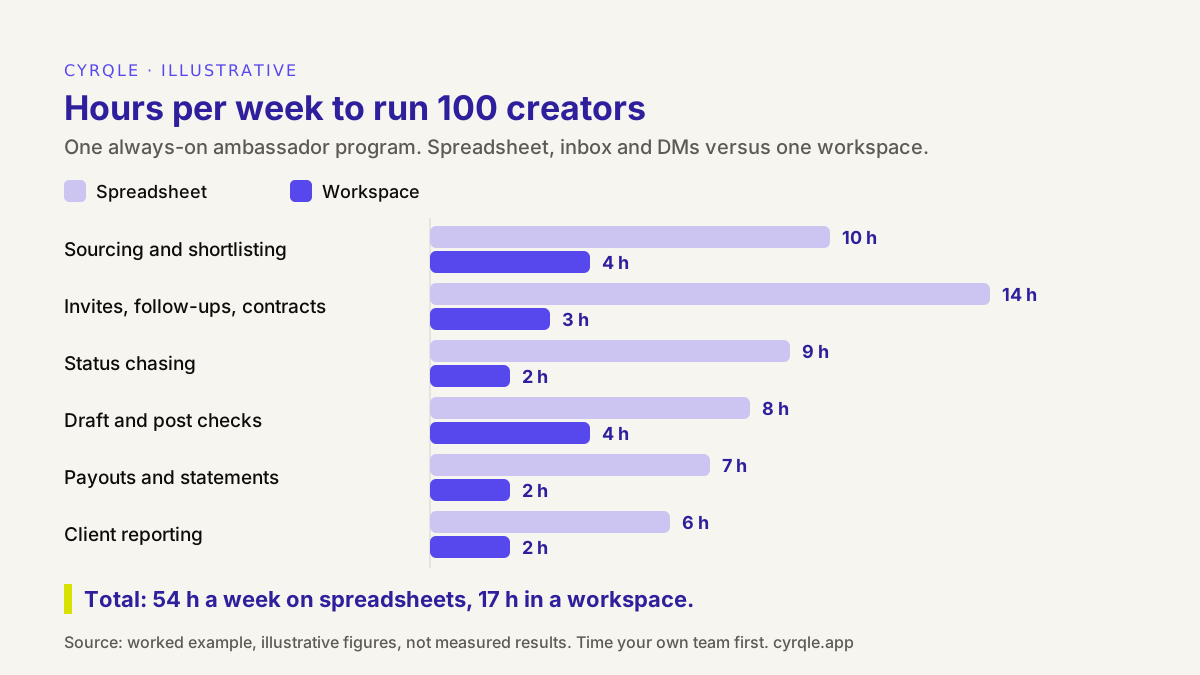
The figures are illustrative, not measured. They assume a monthly deliverable per creator and about 25 new or renewed invites a week. The point is where the hours go: most of the spreadsheet time is spent on chasing and checking, not on creative or client work.
1. Organise the roster as clusters, not one list
A cluster is a group of creators that share an audience signal, such as market, language and theme. You build a cluster once and reuse it for every brief that fits it. A list is a static set of names. Lists are fine for 15 creators. At 100, you need to act on a segment: "invite every Spanish-language running creator in Spain" is one action on a cluster and 40 actions on a list.
Split a large roster on the dimensions you actually send by:
| Split by | Why it matters for ops | Example |
|---|---|---|
| Market | Briefs, product availability, disclosure rules and payment routes differ by country | Spain, Mexico, UK |
| Language | Invites, briefs and follow-ups must reach each creator in their language | Spanish, English |
| Theme | Each brief fits some themes and not others | Running, gym, outdoor |
| Tier or role | Compensation and expectations differ | Core ambassadors, trial ambassadors |
Keep each cluster between about 20 and 50 creators. Smaller clusters create too many sends. Larger ones mix creators who need different briefs. For the ambassador structure itself, tiers and rewards, see our guide to building a creator ambassador program. If your roster lives in a sheet today, moving an influencer roster into clusters covers the migration.
2. Decide per cluster: invite the slice or open applications
For each cluster and brief, choose one of two sourcing modes. Auto-invite means you send the brief to every creator in a chosen cluster slice in one action. Apply means you publish the brief and let creators raise their hand. The glossary entry on cluster auto-invite defines the first mode.
| Situation | Better mode | Why |
|---|---|---|
| Renewal month for existing ambassadors | Auto-invite | You already know the fit; speed matters |
| Tentpole date with a fixed on-sale window | Auto-invite | No time for an application loop |
| New market or new theme | Apply | Your cluster is still thin; let creators find you |
| UGC-style or creative-test briefs | Apply | Self-selection on style gives you more variety |
| Mature program with gaps | Both | Invite the top of the cluster, keep a few seats open for applicants |
The trade-off is control versus discovery. Auto-invite gives you a fast, predictable start, but you only reach creators you already found. Applications bring new names, but they add review time. We compare the two in more depth in auto-invite versus apply-to-brief.
3. Send invites in bulk by market and language
One offer per cluster is the unit of work. Write the offer once from the brief, add a short note with a name token, and send it to the whole selection. Three rules keep bulk sends safe:
- Lock compensation before the first send. A creator who accepts an offer without a fee, commission or product terms will open a negotiation you did not plan for. Fix the deal type first, then invite.
- Send in the creator's language. Spain and Latin America in Spanish, the UK in English. A Spanish creator who gets an English invite reads it as mass mail, because it is.
- One cluster per send. If two clusters need different deal terms or different launch dates, they need different offers.
Keep a short brief that works for every creator in the cluster. Our creator brief template, with a filled example is a good starting point. Personalise the note, not the brief.
4. Let two automatic follow-ups do the chasing
Most of the time a spreadsheet costs goes into reminders. Replace them with a fixed rule: the invite, a first follow-up after five days, a second follow-up five days later, and then the creator drops out of the round. That gives every creator a clear 15-day window and every account manager zero reminders to remember.
Three details make follow-ups work:
- Stop on any reply. A follow-up after the creator has already answered looks careless. The sequence must stop the moment the creator responds.
- Use two message variants. Test two versions of each message and keep the one that earns more replies.
- Drop out on a date. A creator who stays silent after the second follow-up leaves the round. You can invite them again next cycle. What you must not do is keep them as "pending" for six weeks.
Treat dropped-out creators as information. If a whole cluster replies slowly, the offer, the timing or the cluster is wrong, not the follow-up.
5. Track every creator as a state, sorted into your move and their move
This is the core of the model. Every creator in the program is in exactly one state, and every state has an owner. When you know the owner, you know who must act.
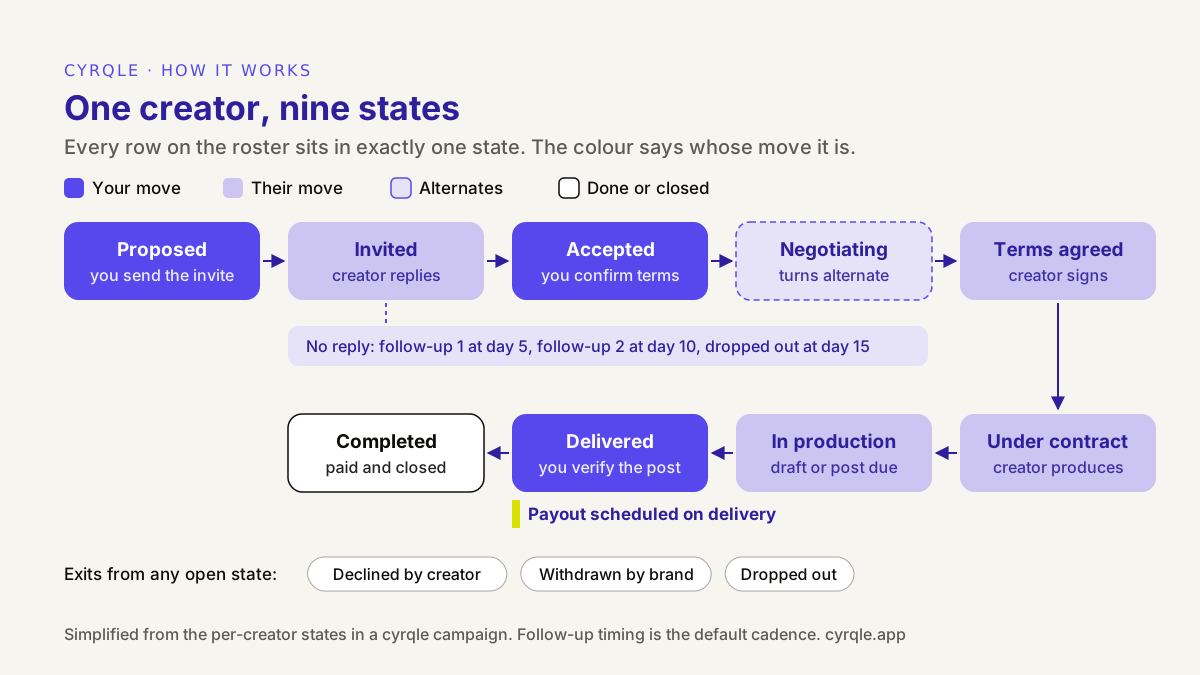
The states group into two buckets you work from every day:
- Your move. Proposed (send the invite), accepted (confirm terms or open negotiation), a counter-offer waiting for you, a draft waiting for review, a delivered post waiting for verification. These are the only rows your team should look at in the morning.
- Their move. Invited, waiting for a signature, in production. Here the follow-ups and deadlines do the work. You look at this bucket only when something is late.
Two more groups keep the board clean. Reserved creators are backups: they fit, but you do not need them yet. Lost creators declined, were withdrawn or dropped out. Keep them visible, because a creator who declined in March may say yes in September.
The test of the model is simple. Ask anyone on the team "what do we owe creators today?" If the answer is a filtered list and not a meeting, the model works.
6. Pay on delivery, not on a calendar
In a spreadsheet program, creators are often paid in one monthly batch. That creates two problems: creators who delivered on day 2 wait four weeks, and the batch includes people whose post was never checked. Tie the payout to the state instead. When a creator's post is verified as delivered, their payout is scheduled. A person still approves the money movement, so you keep control, but nobody has to remember who is due.
Keep these points in the contract and the process:
- Fixed fees are scheduled per verified deliverable.
- Commission is calculated on attributed sales and paid in a separate monthly run, after a hold period for returns. See paying commission to creators every month for the close process.
- Product is shipped and recorded before production, not paid on delivery.
Paying on delivery is also a retention tool. Ambassadors stay in programs that pay on time, and they talk to each other about the ones that do not.
A weekly operating rhythm for 100 creators
The model works best with a fixed weekly rhythm. This is a starting point for a team of two:
| Day | Work | Bucket |
|---|---|---|
| Monday | Clear every "your move" item: confirm terms, answer counters | Your move |
| Tuesday | Send the next invite wave to one cluster, in its language | Your move |
| Wednesday | Review drafts and check required hashtags and handles | Your move |
| Thursday | Verify delivered posts and approve scheduled payouts | Your move |
| Friday | Check late "their move" items, then snapshot the client report | Their move |
Monthly, add one commission run and one cluster review: which clusters replied, delivered and sold, and which need new creators.
Worked example: filling 100 seats across three markets
The agency from the introduction wants 100 active ambassadors for its sportswear client: 40 running creators in Spain, 30 in Mexico and 30 in the UK. Each one owes one reel or TikTok a month for a fixed fee of EUR 120 plus 10% commission on attributed sales. All figures are illustrative; your reply rates will differ.
| Step | Creators | Note |
|---|---|---|
| Invited, day 0 (three bulk sends: ES and MX in Spanish, UK in English) | 160 | About 1.6 invites per seat |
| Replied before follow-up 1 | 64 | |
| Replied after follow-up 1 (day 5) | 28 | |
| Replied after follow-up 2 (day 10) | 16 | 44 of 108 replies came from follow-ups |
| Silent, dropped out at day 15 | 52 | Re-invite next cycle |
| Declined | 16 | 108 replies = 92 accepted + 16 declined |
| Accepted and under contract | 92 | |
| Filled from reserved backups | 8 | 100 seats filled |
Two things stand out. First, 44 of the 108 replies arrived only after a follow-up. In a spreadsheet, that is the part that gets skipped in a busy week. Second, every seat has a known state on day 15. Nobody asks "did they reply?"
Money works the same way. At EUR 120 per verified reel, the monthly fixed-fee total is EUR 12,000, scheduled creator by creator as posts are delivered, not paid in one batch at month end. Commission is calculated from attributed sales and paid in the separate monthly run.
Spreadsheet or workspace: what each one tracks
| Spreadsheet | Campaign workspace | |
|---|---|---|
| Unit of work | One row per creator, edited by hand | One creator in one state, changed by actions |
| Segments | Filters and colour codes | Saved clusters you can invite in one send |
| Follow-ups | Calendar reminders per person | Two automatic follow-ups, then drop out |
| Whose move | Implicit, in a status word | Explicit buckets: your move, their move |
| Payouts | Monthly batch from a separate tab | Scheduled per creator when they deliver |
| Where it still wins | Ad hoc analysis and one-off exports | Less flexible for custom formulas |
A spreadsheet is still useful for analysis. Export from the workspace and model whatever you like. Just do not use the sheet as the system of record for 100 people.
How cyrqle helps
cyrqle runs this operating model in one workspace, per client. As an agency, you switch into each client with Act-As, so every program has its own creators, contracts and payouts. The cyrqle page for agencies covers the multi-client side.
- Clusters. In the Planner you build a cluster with a live reach and cost estimate, save it, compare up to four, and use Add this cluster to a campaign. See creator clusters and planning. The forecast is an estimate, not measured performance.
- Bulk invites by language. From the campaign, select creators and send one offer to all of them, prefilled from the brief, with a note and a name token. The email language can be Auto (Spain and Latin America in Spanish, everyone else in English) or forced to Spanish or English. Invites stay blocked until the campaign's compensation is complete. Creators without an email on file get a claim link you share yourself.
- Applications. You can also share a public campaign link so creators can apply, then review them next to your invited creators.
- Two automatic follow-ups. After the invite, cyrqle sends a follow-up after five days and a second one five days later. It stops when the creator replies and marks the creator as dropped out if they stay silent. You can write two variants of each message and see which earns more replies.
- State buckets. The Creators board shows each creator's state and filters for Your move, Awaiting reply, Reserved (backup), Producing, Completed and Lost. See campaign orchestration.
- Payouts on delivery. The brand funds the campaign wallet. When a creator delivers, cyrqle schedules the payout, and a person triggers the settlement. Creators in Europe and the US are paid through Stripe Connect, in EUR; elsewhere, you pay by bank transfer and record it. Commission owed is calculated and shown in reports, and paying it is a separate step. See compensation and payouts.
What cyrqle does not do: it does not pick your creators for you, it does not pay commission automatically, and it does not track Instagram Stories automatically. If you want to see the model on your own roster, book a 30-minute walkthrough.
FAQ
How many people does it take to run 100 creators?
There is no standard number; it depends on the deliverables, the markets and how much review each client wants. In the illustrative model in this post, the program takes about 54 hours a week on spreadsheets and about 17 in a workspace, which is the difference between more than one full-time person and less than half of one. Time your own team before you staff to any number.
Should we invite the whole cluster or open applications?
Invite the whole slice when you already know the fit and need speed, such as renewal months or a fixed on-sale date. Open applications when you enter a new market or theme, or need creative variety. Mature programs usually do both: invite the top of the cluster and keep a few seats open.
How many follow-ups should we send to creators?
Two. A first follow-up five days after the invite and a second five days later is enough to catch most late replies without becoming spam. After that, drop the creator out of the round and invite them again next cycle.
When should ambassadors be paid?
Pay fixed fees per verified deliverable, as soon as the post is delivered, and pay commission in a separate monthly run after a hold period for returns. Paying in one monthly batch makes early deliverers wait and lets unchecked posts slip into the batch.
Can we still use a spreadsheet for reporting?
Yes. Export creator, cluster and campaign data as CSV and analyse it however you like. The rule is only that the spreadsheet is not the system of record: states, follow-ups and payouts should change in one place, not be typed in by hand.
Sources: Regulation (EU) 2016/679 (GDPR), Article 5. Product behaviour described as of September 2026.
Related field notes.
An influencer campaign compliance checklist for agencies: the six records to keep for every post, from signed contract to payout, and how to audit them fast.
The full lifecycle of a creator campaign, step by step, and the decisions at each stage that decide whether you can measure it and pay for it cleanly. Written for brand and agency teams in Spain, the EU and Latin America.
How to price influencer marketing agency services: retainer, percentage of creator spend or performance fee, with a margin model for one client at three sizes.