
Influencer platform evaluation scorecard (template)
Influencer platform comparison template: a weighted scorecard for brands and agencies, with score definitions, demo evidence and a TCO line for Q4 renewals.
An influencer platform comparison template is a weighted scorecard. You list 12 criteria, give each a weight so the weights total 100, score every vendor from 1 to 5 against written definitions, record what evidence you saw in the demo, and keep the total cost of ownership on a separate line below the score. Copy the template on this page, set the weights before the first demo, and fill in one column per vendor straight after each call.
Picture an agency in Madrid in early October. Its influencer platform renews on 1 January, the contract has a 60-day notice period, and two client brands want to add Mexico next year. The team has until 2 November to decide whether to renew, renegotiate or switch. Without a shared scorecard, that decision goes to whoever gave the best demo. With one, it goes to the vendor that scores highest on the criteria the agency chose in advance, at a cost the agency can defend to its partners.
This template turns our 12-point checklist for choosing an influencer marketing platform into a sheet you can fill in. It is written for brand and agency teams in Spain, the EU and Latin America. It gives you the columns, three sets of weights, a definition for every score, the evidence rules, the TCO line, a worked example and a timeline for the Q4 renewal season. All numbers in the examples are illustrative.
What goes in an influencer platform scorecard?
An influencer platform scorecard has one row per criterion and seven columns per vendor. The columns force three disciplines that a free-form comparison skips: decide what matters before the demo, score against a definition instead of an impression, and record whether you saw the proof.
| Column | What you enter | Rule |
|---|---|---|
| Criterion | One of the 12 criteria from the checklist | Do not add rows mid-evaluation. If something new matters, add it before the first demo and re-weight |
| Weight | Points from 0 to 25 | The 12 weights total exactly 100. Set them before any vendor presents |
| Must-have | Yes or blank | Mark two to four rows. A score of 1 on a must-have row is a knockout |
| Score | 1 to 5 | Use the definitions in the score table below. 2 and 4 sit between the written levels |
| Evidence | L (shown live), W (in writing), C (claimed only) | A C caps the score at 3 |
| Weighted | Weight x score / 5 | The 12 weighted cells add up to a score out of 100 |
| Notes | Link to the screenshot, recording or written answer | One line per row. If you cannot link the proof, the evidence is C |
Under the 12 rows sit the weighted total, a knockout check and the TCO block: annual cost at your current volume, annual cost at twice your volume, and cost per weighted point.
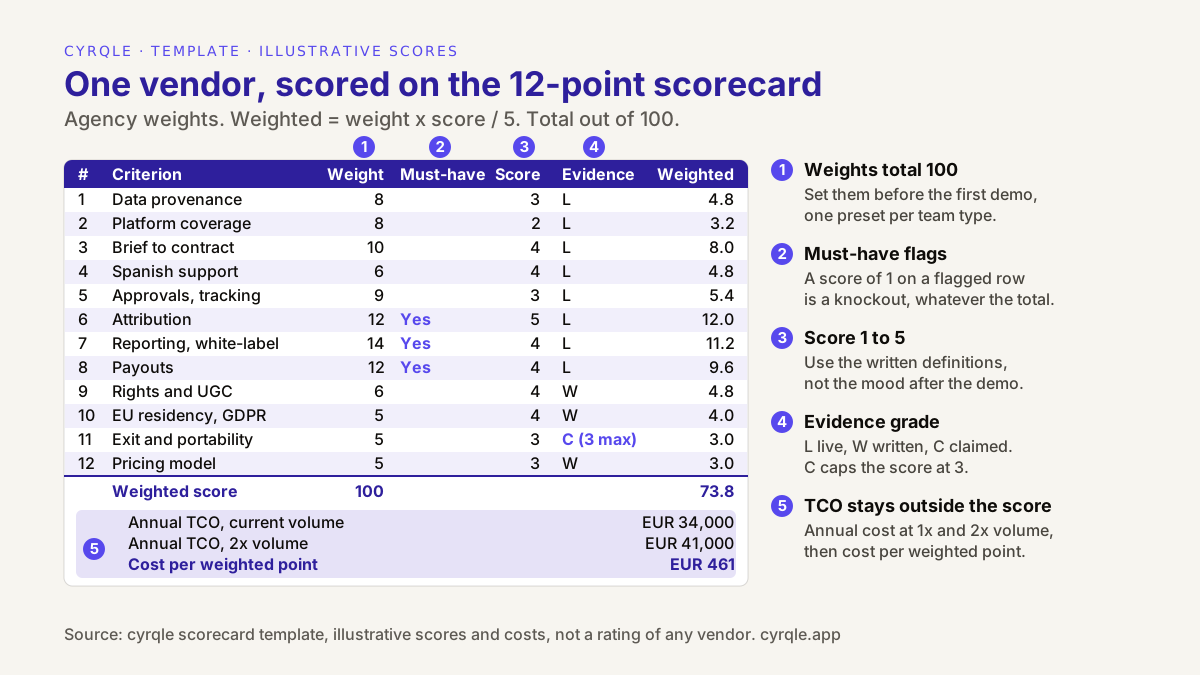
The template: copy this sheet
Copy the table into Excel or Google Sheets, one tab per vendor, and add a summary tab that pulls the totals. The criterion names match the checklist, so every row maps back to a question you can ask in the demo.
| # | Criterion | Weight | Must-have | Score (1-5) | Evidence (L/W/C) | Weighted | Notes and proof |
|---|---|---|---|---|---|---|---|
| 1 | Data provenance | ||||||
| 2 | Platform and market coverage | ||||||
| 3 | Brief-to-contract workflow | ||||||
| 4 | Spanish-language support | ||||||
| 5 | Approvals, disclosure and post tracking | ||||||
| 6 | Attribution method | ||||||
| 7 | Reporting and exports (agencies: white-label) | ||||||
| 8 | Compensation and payouts | ||||||
| 9 | Rights and UGC reuse | ||||||
| 10 | EU data residency and GDPR | ||||||
| 11 | Exit and data portability | ||||||
| 12 | Pricing model | ||||||
| Total | 100 | Sum | |||||
| Knockout check | OK or KNOCKOUT | ||||||
| Annual TCO, current volume | EUR | ||||||
| Annual TCO, 2x volume | EUR | ||||||
| Cost per weighted point (1x and 2x) | EUR |
The formulas
Put the criteria in rows 2 to 13 with these columns: A number, B criterion, C weight, D must-have (Y or blank), E raw score, F evidence, G capped score, H weighted, I notes.
- Capped score (G2):
=IF(F2="C",MIN(E2,3),E2) - Weighted (H2):
=C2*G2/5 - Weight check (C14):
=SUM(C2:C13)must show 100. If it does not, fix the weights before you score anyone. - Weighted total (H14):
=SUM(H2:H13) - Knockout check (H15):
=IF(COUNTIFS(D2:D13,"Y",G2:G13,"<=1")>0,"KNOCKOUT","OK") - Cost per weighted point (H18, H19): annual TCO divided by H14, once at current volume and once at twice the volume.
The capped score column matters. Without it, a confident "yes, we do that" earns the same points as a feature you watched working on your own brief.
How should you weight the criteria for a brand or an agency?
Weight the criteria by the job your programme does, not by what is easy to demo. A sales-led brand needs to prove and pay for revenue, so attribution and payouts carry the most points. An awareness-led brand needs reach, coverage and proof that posts went live. An agency needs all of that per client, plus reports it can put its own name on. The three presets below each total 100. Start from the closest one and move points, never add them.
| Brand, sales-led | Brand, awareness-led | Agency | |
|---|---|---|---|
| 1. Data provenance | 8 | 12 | 8 |
| 2. Platform and market coverage | 7 | 12 | 8 |
| 3. Brief-to-contract workflow | 10 | 8 | 10 |
| 4. Spanish-language support | 8 | 7 | 6 |
| 5. Approvals, disclosure and post tracking | 7 | 14 | 9 |
| 6. Attribution method | 18 (must-have) | 8 | 12 (must-have) |
| 7. Reporting and exports | 6 | 9 | 14 (must-have) |
| 8. Compensation and payouts | 14 (must-have) | 6 | 12 (must-have) |
| 9. Rights and UGC reuse | 8 | 9 | 6 |
| 10. EU data residency and GDPR | 5 | 6 | 5 |
| 11. Exit and data portability | 4 | 4 | 5 |
| 12. Pricing model | 5 | 5 | 5 |
| Total | 100 | 100 | 100 |
The sales-led column is the same set of weights used in the worked example of the checklist, so you can check your sheet against that result. Three adjustments are common:
- You pay commission every month. Move 3 to 5 points from data provenance or reporting to payouts, and make payouts a must-have. Commission net of refunds is where manual work grows fastest.
- You reuse creator content on your site or in ads. Raise rights and UGC reuse to 10 or 12, and make it a must-have if paid-ads use is part of the plan.
- Your creators post outside Instagram and TikTok. Raise coverage and make it a must-have. A network that is searched but not tracked leaves you checking deliverables by hand.
What changes for an agency?
An agency scores the same 12 criteria, but three rows get stricter definitions. On data provenance, check that one client cannot see another client's lists, creators or notes. On reporting, a 5 needs reports in the client's or the agency's branding, with creator fees hidden, exported as PDF and CSV; our white-label reporting checklist for agencies lists what to test. On payouts, the agency fee should appear as its own line on each payout statement, separate from the creator fee. Agencies also tend to weight exit higher than brands, because a client that leaves expects its creator history to leave with it. The wider buying guide for influencer software for agencies covers multi-client workspaces and margin in more depth.
What does each score from 1 to 5 mean?
A score is only comparable across vendors if every evaluator uses the same definition. Use the general scale first, then the per-criterion anchors.
| Score | General meaning |
|---|---|
| 5 | Shown live on your brief or your creators, complete, and confirmed in writing where it matters (countries, formats, terms) |
| 4 | Shown live, with a minor gap that has a known workaround |
| 3 | Partly shown, shown only on demo data, or available through a workaround that costs your team time |
| 2 | Described but not shown, on the roadmap, or only possible with another tool |
| 1 | Not available, or the answer was a red flag |
The anchors below describe a 1, a 3 and a 5 for each criterion. A 2 or a 4 sits between them.
| Score 1 | Score 3 | Score 5 | |
|---|---|---|---|
| 1. Data provenance | A database size with no answer on source or refresh | Sources named, but measured and estimated figures are not separated; missing creators added on request | Sources named per field, estimates labelled, a missing creator fetched live in the demo |
| 2. Platform and market coverage | A network you need is neither searched nor tracked | Searched, but posts on one of your networks are not tracked automatically | Every network and format in your plan is searched and tracked, with the list in writing; search works in Spanish |
| 3. Brief-to-contract workflow | Contracts happen outside the platform | Contract in the platform, but terms are not frozen or the creator needs an account to sign | Brief to ranked creators to invites to a signed contract with a frozen terms snapshot, shown live |
| 4. Spanish-language support | Only the marketing site is in Spanish | Interface in Spanish; invites or contracts in English only | Interface, invites, contracts and rights templates in Spanish, sent by market |
| 5. Approvals, disclosure and post tracking | Screenshots are the only proof a post went live | Drafts approved in the tool; some formats tracked by hand | Draft sign-off, an automated check for required hashtags and handles, and automatic tracking of your formats |
| 6. Attribution method | One 'influenced revenue' number with no method | Codes and links reported, gross of refunds, no confidence per order | Signals named, a confidence level per order, revenue net of refunds, one sale traced to its creator live |
| 7. Reporting and exports | Screenshots or a live login only | PDF or CSV but not both, or no white-label for agencies | Reports in PDF and CSV; for agencies, white-label with creator fees hidden and client data separated |
| 8. Compensation and payouts | No payouts, or 'we support payments' with no country list | Pays in some of your markets; the rest by hand, or commission paid without a statement | Country and currency list in writing that covers your markets, the approval path shown, a statement per payout |
| 9. Rights and UGC reuse | Rights handled by 'a clause in the contract' | Licences stored, but scope or withdrawal not recorded | A licence record with scope, status and PDF; withdrawal recorded and enforced on display; paid-ads use a separate tick |
| 10. EU data residency and GDPR | No sub-processor list or no DPA | DPA available, but regions are vague or some processing sits outside the EU | EU regions named, a public sub-processor list, a DPA and the security status in exact words |
| 11. Exit and data portability | Export 'on request' only | Some self-serve exports; contracts or licences missing | Self-serve exports of lists, contracts, licences, codes and sales, plus data return terms in writing |
| 12. Pricing model | No price structure before you sign | Structure clear, but the cost at twice the volume is unknown or renewal increases are uncapped | Fixed and variable parts in writing, a quote at twice the volume, payout fees stated, a cap on renewal increases |
For criterion 10, the reference for what a processor contract must contain is Article 28 of the GDPR on EUR-Lex. Scoring it does not replace a review by your data protection officer or lawyer; this template is not legal advice.
How do you fill in the demo evidence column?
The evidence column records how you know a score is true. It has three values:
- L, shown live. You saw it working in the demo, ideally on your own brief or your own creators. Save a screenshot or the timestamp in the recording.
- W, in writing. The vendor confirmed it in an email, a proposal, the contract or public documentation you can link. Country lists, supported formats, exit terms and security status usually belong here.
- C, claimed only. Someone said it on the call, but you did not see it and do not have it in writing. A C caps the score at 3, however good the answer sounded.
Run the demo on your material. Send a real brief, five creators you already know and your markets two days before the call, and ask the vendor to use them. Our list of 15 questions to ask an influencer software vendor in a demo covers the scripted half of this. If you used its 0 to 2 scale during the call, convert afterwards: a 0 becomes a 1 here, a 1 becomes a 2 or 3, and a 2 becomes a 4 or 5 depending on how complete the answer was.
After the call, send every C back to the vendor as a written question. A vendor that confirms in writing moves from C to W and the cap lifts. A vendor that does not answer keeps the C. That follow-up email is also the best record you will have if the feature turns out not to exist after you sign.
Two habits keep the column honest. First, score straight after each demo, before the next vendor presents. Second, when more than one person evaluates, each scores alone first, then the group discusses only the rows where scores differ by two points or more.
How do you add the TCO line without double counting?
Total cost of ownership is the full annual cost of running your programme on a platform: licence, seats, usage, payment and payout fees, any take rate, any agency fee, and the internal hours the tool does not remove. Keep it outside the weighted score. Criterion 12 scores the pricing structure: how clear it is and how it behaves when you grow. The TCO line records the amount. Scoring the amount as well would count price twice.
Work out three numbers per vendor:
- Annual TCO at your current volume. Use the line-by-line worksheet in our guide to influencer platform pricing and its hidden costs. Leave creator fees out unless the vendor charges a percentage of them.
- Annual TCO at twice your volume. Double the creators, payouts and seats, and ask each vendor to quote that scenario in writing. The structure decides who gets expensive as you grow.
- Cost per weighted point. Divide each TCO by the weighted score. It answers the question finance will ask: what does each point of fit cost us?
Add the tools you would need to fill a gap. If a vendor scores 1 on payouts and you would pay creators through a separate tool, that tool's cost belongs in its TCO. If the real comparison is not between platforms at all but between a platform, an agency and an in-house team, start with the cost model and break-even for platform, agency and in-house and use this scorecard for the platform branch.
Worked example: an agency compares three platform types at renewal
Back to the agency in Madrid. It runs creator programmes for four client brands selling in Spain and Mexico, with fixed fees plus commission. Its current tool is a campaign manager. It shortlists two alternatives: a creator commerce platform and a lower-cost creator database. It uses the agency weights, with attribution, reporting and payouts as must-haves. All scores, grades and costs are illustrative and describe anonymous platform types, not real vendors.
| Criterion | Weight | Creator database | Campaign manager (current) | Creator commerce platform |
|---|---|---|---|---|
| 1. Data provenance | 8 | 5 L | 4 L | 3 L |
| 2. Platform and market coverage | 8 | 5 L | 5 L | 2 L |
| 3. Brief-to-contract workflow | 10 | 1 L | 4 L | 4 L |
| 4. Spanish-language support | 6 | 3 L | 3 L | 4 L |
| 5. Approvals, disclosure and tracking | 9 | 1 L | 5 L | 3 L |
| 6. Attribution method (must-have) | 12 | 1 L | 2 L | 5 L |
| 7. Reporting and exports (must-have) | 14 | 3 L | 5 L | 4 L |
| 8. Compensation and payouts (must-have) | 12 | 1 W | 2 W | 4 L |
| 9. Rights and UGC reuse | 6 | 1 W | 3 L | 4 W |
| 10. EU residency and GDPR | 5 | 3 W | 4 W | 4 W |
| 11. Exit and portability | 5 | 4 W | 3 W | 3 C |
| 12. Pricing model | 5 | 5 W | 3 W | 3 W |
| Weighted score (out of 100) | 100 | 49.8 | 72.2 | 73.8 |
| Knockout check | Knockout (6 and 8) | OK | OK | |
| Annual TCO, current volume | EUR 14,000 | EUR 30,000 | EUR 34,000 | |
| Annual TCO, 2x volume | EUR 16,000 | EUR 52,000 | EUR 41,000 | |
| Cost per point, current volume | Not ranked | EUR 416 | EUR 461 | |
| Cost per point, 2x volume | Not ranked | EUR 720 | EUR 556 |
The creator commerce platform's exit score of 3 is capped: the vendor said full exports were available but did not show them, and has not yet answered in writing.
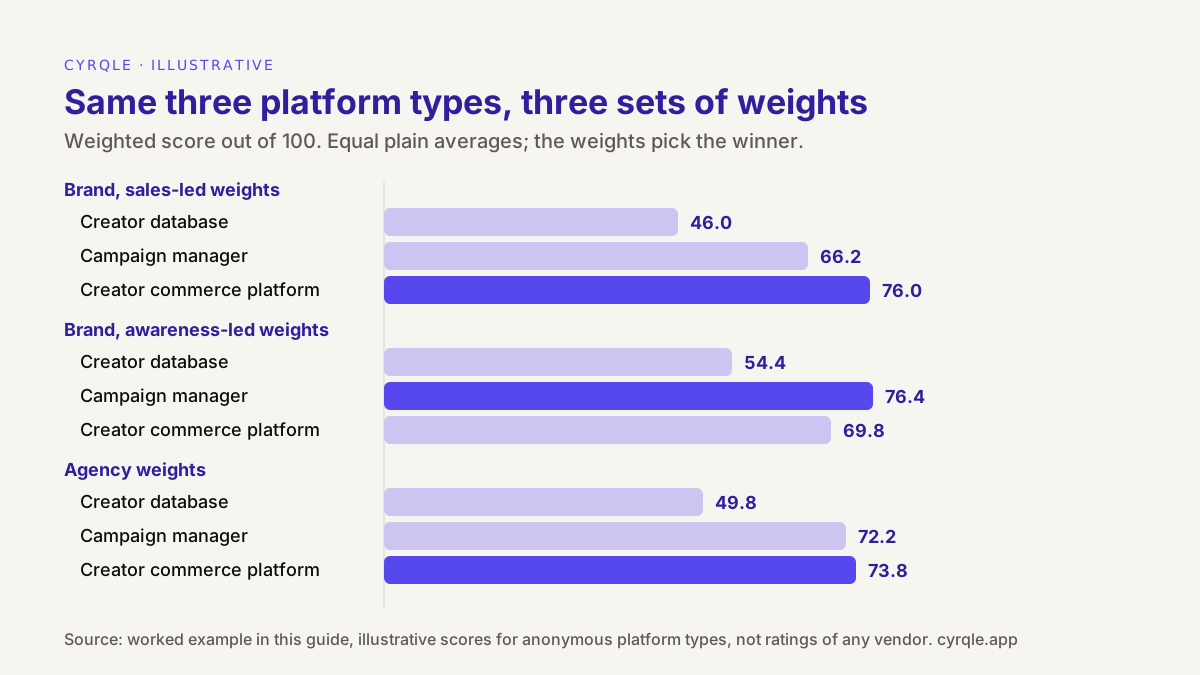
Four lessons come out of the sheet:
- The cheapest tool is out before price is discussed. The creator database has the best data and the lowest TCO, but it scores 1 on two must-haves. For an agency that pays commission, that is a knockout, not a discount.
- The weights pick the winner, not the features. The campaign manager and the commerce platform average exactly 3.58 each. Under awareness-led weights the campaign manager would win by 6.6 points. Under sales-led weights the commerce platform would win by 9.8. Under agency weights they are 1.6 points apart.
- A gap under about 5 points is a tie. Scores carry judgement, so treat a small gap as a draw and decide on the must-have rows, the TCO and the exit terms.
- Volume settles the tie. At current volume the incumbent costs EUR 416 per point and the commerce platform EUR 461. At twice the volume, the incumbent's per-seat pricing and percentage-of-spend fee lift it to EUR 720 per point, against EUR 556. If the agency expects to stay at four clients, renewing and negotiating a cap on the renewal price is defensible. If it expects to add the two Mexican launches and more clients, switching is the cheaper choice per point of fit.
Whichever way it goes, the scorecard is now a negotiating document. The agency can show the incumbent its scores of 2 on attribution and payouts and ask, in writing, what will change before the next renewal.
When should you run the scorecard? A Q4 renewal timeline
Run the scorecard six to ten weeks before your notice deadline, not before your renewal date. Software contracts often renew automatically and require written notice before the term ends. Check your own contract: if it renews on 1 January 2027, a 90-day notice period ends around 3 October 2026, a 60-day period around 2 November, and a 30-day period around 2 December. If your deadline has already passed, run the scorecard anyway and use it to negotiate the renewal terms and to plan the next cycle.
| When | Step | Output |
|---|---|---|
| Week 1 | Find the renewal date, notice period and price cap in the current contract. Pull last year's volume: creators, payouts, seats, markets | A deadline and a volume baseline |
| Week 1 | Pick a weight preset, adjust it, mark the must-haves. Get sign-off from whoever owns the budget | Locked weights totalling 100 |
| Week 2 | Shortlist three or four vendors, including the incumbent. Send each the same brief, five creators and your markets | Demo invitations |
| Weeks 3 and 4 | Run the demos. Score each one the same day, with the evidence column | Raw scores and evidence grades |
| Week 5 | Send every C back as a written question. Ask for quotes at current and double volume. Review the DPA and security status | Capped scores, TCO at 1x and 2x |
| Week 6 | Write a one-page decision memo with the totals, knockouts and cost per point. Give notice or renegotiate before the deadline | A decision on record |
| December | If you switch, export everything from the old tool while you still have access: lists, contracts, licences, codes, sales | A clean start in January |
The decision memo is the same document your finance team will want to see when they approve next year's budget. Our one-page template for justifying a creator budget to your CFO has a layout you can reuse for it.
Common mistakes with platform scorecards
- Setting weights after the demos. The vendor with the best demo quietly gets the most important criteria. Lock the weights in week 1.
- Scoring the slide, not the screen. Without an evidence column, claims and working features earn the same points.
- Averaging without weights. In the example above, a plain average makes two very different tools look identical.
- Putting price inside the score. It hides the trade-off between fit and cost that the decision is really about.
- Ignoring the incumbent. Score your current tool with the same sheet. Its weak rows are the agenda for the renewal conversation.
- Forgetting the exit. The export you need in December is easier to test in October, while both contracts are live.
How cyrqle helps
The fastest way to fill in a cyrqle column is a 30-minute demo on your own category. Send your brief, five creators and your markets beforehand, and we will go through the 12 rows live, so most of the evidence column ends up as L or as a clear "no". Our written answers to every demo question, including the ones that are "partly" or "no", are in the demo questions guide linked above.
Where cyrqle is likely to score well, and where it is not:
- Attribution (6) and reporting (7). Per-creator promo codes and tracking links, a tag under 2KB on your store, the Shopify pixel and signed order webhooks from Shopify, WooCommerce and Magento. Each sale carries a confidence tier, revenue is net of refunds, and an audit chain links sale, code, post and creator. Reports export as PDF and CSV: brand performance, campaign, creator media kit, creator list and cluster.
- Agency rows. In cyrqle for agencies, you manage client brands from one console, act as a client with per-member access, set per-client commercial terms and send white-label reports with creator fees hidden.
- Payouts (8), with limits. You fund the campaign, a payout is scheduled when the creator delivers, and a person on your team triggers settlement. Creators in Europe and the US are paid through Stripe Connect, in EUR. Elsewhere, you pay by bank transfer and record it in cyrqle. Commission owed is calculated and shown; paying it is a separate step.
- Coverage (2): our weakest row for some teams. cyrqle discovers and tracks creators on Instagram and TikTok only, has no TikTok Shop integration and does not track Stories automatically. If YouTube or TikTok Shop is central to your plan, weight coverage accordingly and expect a low score from us.
- Residency (10) and pricing (12). Data is stored in the EU, and our SOC 2 Type II audit is in progress; see security. Pricing is a custom monthly base plus usage for brands and agencies. Ask us on the call for a written quote at your current volume and at twice that volume, so you can fill in both TCO lines.
FAQ
Should price be part of the weighted score?
No. Score the pricing structure in criterion 12 and keep the annual amount on the TCO line below the total. Then divide TCO by the weighted score to compare cost per point. Mixing the amount into the score counts price twice and hides the trade-off between fit and cost.
How many vendors should I score?
Three or four, including your current tool. Fewer gives you no comparison; more turns the demos into a blur and delays the decision past your notice deadline. Use an honest comparison of influencer platforms in Spain to build the shortlist, then score only the vendors that pass your must-haves on paper.
What if two vendors score within a few points?
Treat a gap of under about 5 points as a tie. Decide on the must-have rows, the TCO at twice your volume and the exit terms. If it is still level, run a short paid pilot with real creators on the vendor you lean towards before you give notice to the other.
Can I use the same scorecard for a brand and an agency?
Yes. The 12 criteria are the same; the weights and three definitions change. Agencies weight reporting and white-label higher, check that client data stays separate, and need the agency fee shown as its own line on each payout statement.
Who should fill in the scorecard?
Everyone who will live with the tool: the person who runs campaigns, whoever pays creators or reconciles invoices, and, for agencies, an account lead who sends client reports. Each person scores alone first. Discuss only the rows where scores differ by two points or more.
Sources
- Regulation (EU) 2016/679 (GDPR), Article 28 on processors, EUR-Lex: https://eur-lex.europa.eu/eli/reg/2016/679/oj
Related material.
Justify your influencer marketing budget on one page: spend, attributed revenue as a range, MER, payback, holdout result and risks, with a worked euro example.
Free influencer brief template in nine sections, from objective to approval, with a filled Black Friday 2026 example, disclosure wording and usage rights.
Influencer marketing proposal template for agencies: eight sections from objective to fees, a creator shortlist with labelled estimates and a Q4 worked example.