
Influencer rate card template (EUR): tiers, formats, rights and exclusivity
Influencer rate card template in EUR: tier, format, base fee, CPM check, rights, exclusivity and rush uplifts, with spreadsheet formulas and a filled example.
An influencer rate card template is a spreadsheet with one row per format and twelve columns: tier, format, expected views, base fee, effective CPM, a CPM check, rights, rights uplift, exclusivity, exclusivity uplift, rush uplift and total fee. The base fee covers organic use only. Every extra is a separate percentage line on top, and three formulas do the arithmetic.
A brand team in Madrid gets quotes from twelve creators for a running-shoe launch. One quote is "EUR 900 all in". Another is "EUR 600 plus rights to be agreed". A third is a PDF with follower counts and no prices. Nobody can compare them, so the team negotiates each one from zero. A standard rate card fixes this: every quote goes into the same columns, so you can sort, compare and push back on one line at a time.
This guide gives you the template column by column, the formulas for Google Sheets and Excel, lookup tables with illustrative uplifts, a filled example row, a full rate card for one illustrative creator, and a worked offer with rights, exclusivity and rush. It is written for brand and agency teams in Spain and the EU. Creators can use the same sheet to publish their own prices. Every number here is illustrative, chosen to show the method, not a market benchmark.
What goes in an influencer rate card?
An influencer rate card holds the information a buyer needs to price one deliverable: who the creator is (tier), what they make (format), how many people will see it (expected views), what it costs (base fee), what you can do with it afterwards (rights), what the creator gives up (exclusivity), and how fast they must deliver (rush). Everything else is a note.
The template splits that information into twelve columns, A to L. Put one creator on each tab and one format or bundle on each row.
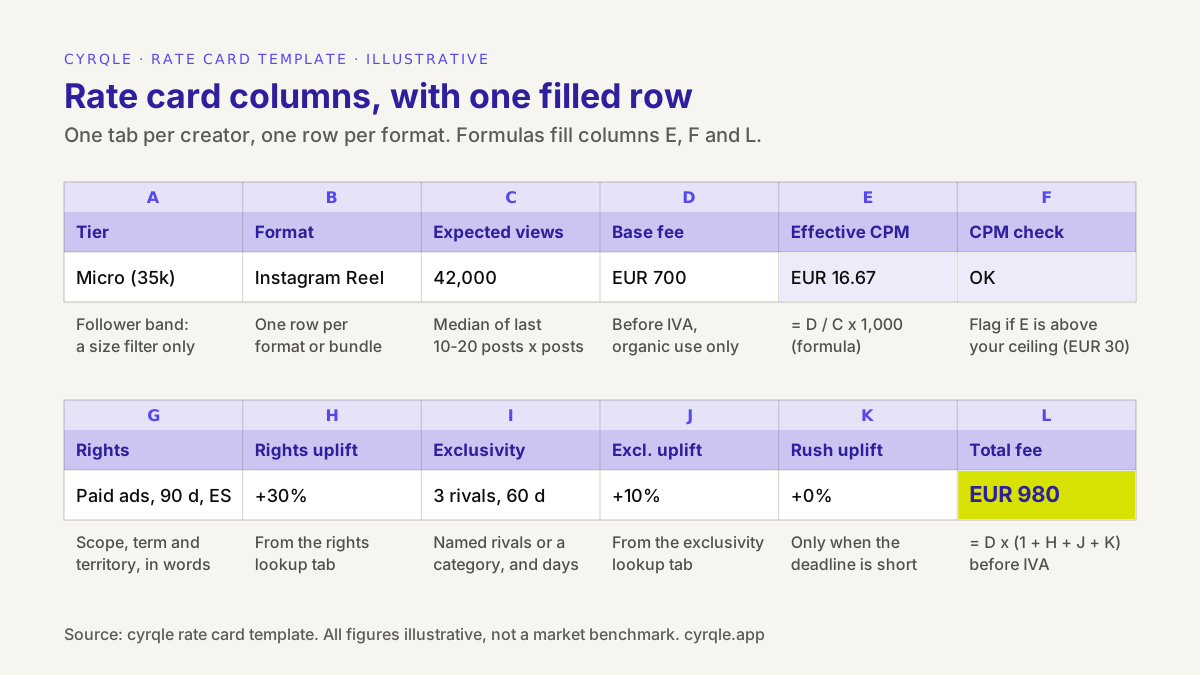
| Column | Name | What you enter | Type |
|---|---|---|---|
| A | Tier | Follower band: nano, micro, mid, macro, mega | Text |
| B | Format | Instagram Reel, TikTok video, carousel, story set, bundle, UGC video | Text |
| C | Expected views | Median views of the last 10 to 20 posts in this format, times the number of posts in the row | Number |
| D | Base fee | Fee in EUR before IVA, for production and organic posting only | Number |
| E | Effective CPM | D / C x 1,000 | Formula |
| F | CPM check | OK, Negotiate or Over ceiling, against your target and ceiling | Formula |
| G | Rights | Scope, term and territory in words, for example "Paid ads, 90 d, ES" | Text |
| H | Rights uplift | Percentage of D, from the rights lookup table | Percent |
| I | Exclusivity | Named rivals or a category, and the number of days | Text |
| J | Exclusivity uplift | Percentage of D, from the exclusivity lookup table | Percent |
| K | Rush uplift | Percentage of D, only when the deadline is short | Percent |
| L | Total fee | D x (1 + H + J + K), before IVA | Formula |
Why the tier is a label, not a price
The tier column tells you the size band of the account. It is useful for filtering and for a sanity check against market bands. It should not set the price. Two creators in the same tier can differ in median views by a factor of five, so the template prices on column C, not column A. The method behind this is in pricing creators on median views instead of followers.
Why expected views is per row, not per creator
A creator's Reels, TikToks, carousels and stories reach different numbers of people. Count views per format. For a bundle row, add the expected views of each post in the bundle. For a story set, use the median views per frame times the number of frames, from screenshots the creator sends you, because story views are not public.
The formulas: effective CPM, CPM check and total fee
The template has three formulas. Everything else is input. The formulas below assume data starts on row 2 and a second tab called Lookups holds your settings.
| Column | Google Sheets and Excel (English locale) |
|---|---|
| E Effective CPM | =IF(C2>0, D2/C2*1000, "n/a") |
| F CPM check | =IF(E2="n/a","n/a",IF(E2<=Lookups!$B$2,"OK",IF(E2<=Lookups!$B$3,"Negotiate","Over ceiling"))) |
| L Total fee | =D2*(1+H2+J2+K2) |
Format H, J and K as percentages, so 30% is stored as 0.30. Format D, E and L as currency in EUR.
Effective CPM is the cost per thousand expected views. It is the number that makes a 20,000-follower creator and a 300,000-follower creator comparable. The CPM check compares it with two settings on the Lookups tab: a target CPM in cell B2 (the price you want to pay) and a ceiling CPM in cell B3 (the price you will not go above). In the illustrative example, those are EUR 20 and EUR 30 per 1,000 views, the same numbers used in our negotiation guide for micro-influencer fees. Set your own from your paid social costs and past campaigns.
Total fee adds the uplifts to the base fee. Each uplift is a percentage of the base fee, not of the running total, so the lines stay independent. Do not multiply them on top of each other: compounding inflates the total and makes each line harder to negotiate.
Run the CPM check on the base fee, not on the total fee. The uplifts buy something other than views: reuse, the creator's silence towards your competitors, or speed. Mixing them into the CPM makes a creator who sells you paid-ads rights look expensive when they are not.
The lookup tables: rights, territory, exclusivity and rush
The Lookups tab holds the percentages your team agrees once and then reuses on every offer. That is what standardises your offers: two people on the team who price the same request get the same number. The tables below are illustrative, and match the method in the usage rights and exclusivity calculator.
Rights: scope and term
| Scope | 30 days | 90 days | 365 days |
|---|---|---|---|
| Organic repost on your own social accounts | Included | +5% | +15% |
| Website, product pages and email | +5% | +10% | +20% |
| Paid ads from your ad accounts | +20% | +30% | +60% |
| Paid ads from the creator's handle | +30% | +45% | +80% |
All uplifts illustrative. If you buy two scopes, add both cells. A year on product pages plus 90 days of paid ads is 20% + 30% = 50% of the base fee.
Territory
| Territory | Illustrative uplift |
|---|---|
| One country | +0% |
| Several named markets | +10% |
| Worldwide | +20% |
Add the territory uplift to the rights uplift in column H. Territory mostly matters for paid ads. Write the markets by name in column G.
Always write the term and territory in the contract, not only in the sheet. In Spain, article 43.2 of the Ley de Propiedad Intelectual limits a transfer of rights with no stated term to five years, and one with no stated territory to the country where it was granted. The same article limits a transfer that does not name its uses to what the contract strictly needs, so name paid ads explicitly. It is not legal advice: for a specific contract, ask your lawyer.
Exclusivity
| Exclusivity | 30 days | 60 days | 90 days |
|---|---|---|---|
| None | +0% | +0% | +0% |
| Up to five named competitors | +5% | +10% | +15% |
| A whole product category | +10% | +20% | +30% |
Illustrative. Exclusivity costs the creator real income, so a category ban costs more than a short list of names. Ask for the narrowest scope that protects the campaign.
Rush
| Lead time from approved brief to publish | Illustrative uplift |
|---|---|
| Standard: more than 5 working days | +0% |
| Short: 5 working days or fewer | +10% |
| Express: within 48 hours of approval | +15% to +25% |
Rush is the easiest uplift to avoid. A two-week publish window instead of a fixed day often removes it and lowers the base fee too.
Where does the base fee come from?
The base fee in column D comes from the creator's quote. Check it against two things before you accept it: the market band for the tier and format, and the effective CPM that the formula gives you.
For the market band, our guide to influencer prices in Spain by tier and format gives illustrative 2026 ranges. For one Instagram post or Reel, those ranges are roughly EUR 50 to 250 for nano creators, EUR 150 to 800 for micro, EUR 600 to 4,000 for mid-tier and EUR 3,000 to 10,000 for macro, with wide overlap. A quote far outside the band for its tier needs a reason, and the reason is usually in column C.
For the CPM check, let the formula decide. A quote at the top of the tier band can still be good value if the creator's median views are high. A quote at the bottom can be poor value if nobody watches.
A filled example: one creator's full rate card
Here is one tab of the template, filled in for an illustrative running creator in Valencia with 35,000 Instagram followers. The base fees are what the creator quotes for organic use. The views are medians from the last 15 posts per format.
| Format | Expected views | Base fee (before IVA) | Effective CPM | CPM check |
|---|---|---|---|---|
| Story set, 3 frames | 15,000 (5,000 per frame) | EUR 300 | EUR 20.00 | OK |
| Carousel post | 18,000 | EUR 450 | EUR 25.00 | Negotiate |
| Instagram Reel | 42,000 | EUR 700 | EUR 16.67 | OK |
| TikTok video | 50,000 | EUR 650 | EUR 13.00 | OK |
| Reel + TikTok bundle | 92,000 | EUR 1,200 | EUR 13.04 | OK |
| UGC video, not posted | None | EUR 350 | n/a | n/a |
All figures illustrative. The target CPM is EUR 20 and the ceiling is EUR 30.
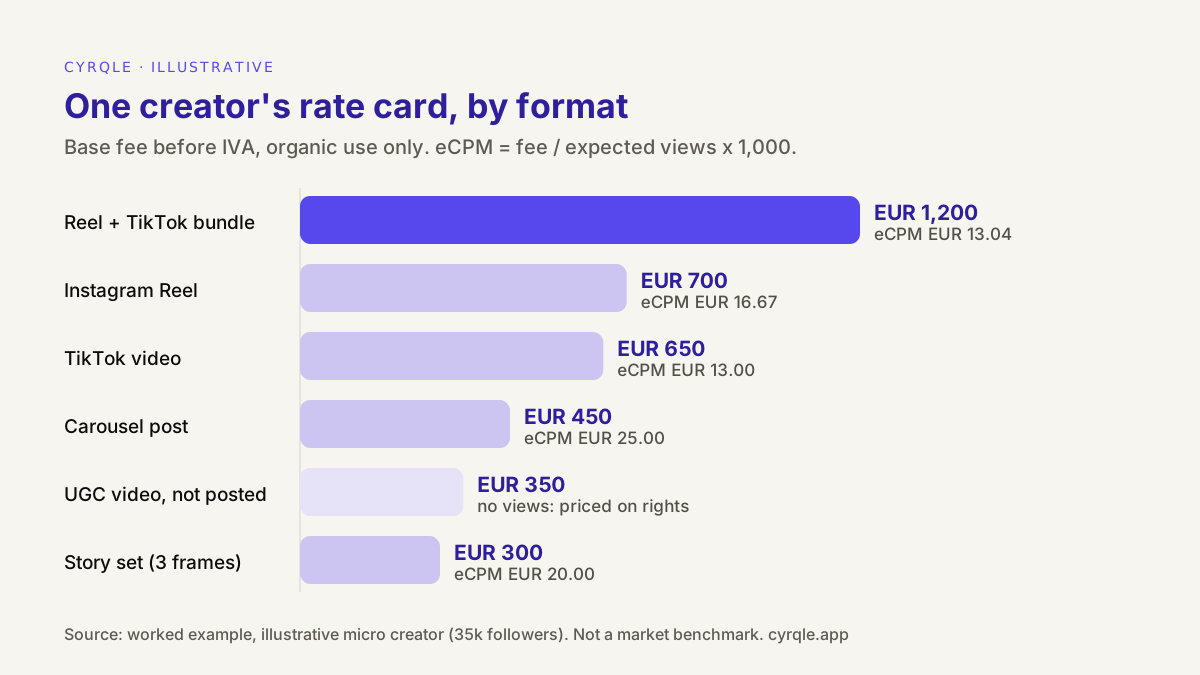
Three things stand out when the rate card is in this shape:
- The bundle is the best buy per view. The Reel and the TikTok cost EUR 1,350 separately and EUR 1,200 together, about 11% less, for 92,000 expected views.
- The carousel is the format to negotiate. At EUR 25 per 1,000 views it is between the target and the ceiling. Either offer about EUR 360 (the target CPM times 18,000 views) or swap it for a story set.
- The UGC video has no CPM. It is never posted on the creator's account, so you pay for the content and the rights to use it. Price it against what the same video would cost from a production studio, and always attach a rights line.
A worked offer: rights, exclusivity and rush on top
The brand wants the Reel + TikTok bundle. The performance team wants to run the Reel as a paid ad in Spain and Portugal for 90 days. The brand manager wants the creator to avoid other running-shoe brands for 30 days. The launch date has moved, so the creator has five working days.
| Line | Lookup | Percentage | Amount |
|---|---|---|---|
| Base fee: Reel + TikTok bundle, organic | Column D | EUR 1,200 | |
| Rights: paid ads from brand accounts, 90 days | Rights table | +30% | EUR 360 |
| Territory: Spain and Portugal | Territory table | +10% | EUR 120 |
| Exclusivity: running-shoe category, 30 days | Exclusivity table | +10% | EUR 120 |
| Rush: 5 working days | Rush table | +10% | EUR 120 |
| Total fee before IVA | D x (1 + 0.40 + 0.10 + 0.10) | +60% | EUR 1,920 |
Illustrative. In the sheet, column H holds 40% (30% for scope and term plus 10% for territory), column J holds 10% and column K holds 10%.
The CPM check still runs on the base fee: EUR 1,200 for 92,000 views is EUR 13.04, well under the target. The all-in effective CPM is EUR 20.87, and that is fine, because EUR 720 of the total buys reuse, exclusivity and speed, not reach.
If the creator charges IVA, the invoice adds it on top. The general IVA rate in Spain is 21% under article 90 of the Ley del IVA, which is EUR 403.20 on EUR 1,920. Whether IVA applies, and whether you must withhold IRPF, depends on who the creator is and where they are based. Our guide to paying influencers in Spain, with IRPF and IVA covers the cases. It is not tax advice: check your situation with your tax adviser.
Each line is now negotiable on its own. If the budget is EUR 1,700, the brand can drop the rush by keeping the original date (EUR 1,800) and cut the territory to Spain only (EUR 1,680), without touching the creator's base fee.
Optional columns worth adding
The twelve core columns are enough to compare offers. Teams that send rate cards to finance or to a client usually add these:
| Column | What it holds | Why it helps |
|---|---|---|
| M Revision rounds | Number of rounds included, for example 2 | Extra rounds are a common source of unplanned cost |
| N Payment terms | Days from invoice to payment | Faster payment is worth something to a self-employed creator, and costs you little |
| O Commission | Percentage on attributed sales, if any | Turns part of the fee into a hybrid deal |
| P Valid until | Date the prices expire | Views change; a quote from six months ago is out of date |
| Q Source of views | Screenshot, connected account or public count | Tells a reviewer how far to trust column C |
Keep the contract in step with the sheet. Every line in G, I and K must appear in the agreement with the same scope, term, territory and dates. Our influencer contract template for Spain has clauses for each.
How creators can use this as their own rate card
Creators can publish the same sheet. Keep columns A to D, list the base fee per format for organic use, and turn G to K into a short list of options with their prices. A brand that sees "paid ads, 90 days: +30%" can buy it or drop it without asking you to cut your base fee.
Three tips for creators:
- Show column C. Median views per format are the strongest argument for your price. Date them and refresh them every one or two months.
- Show the effective CPM if it is good. If your Reel works out at EUR 15 per 1,000 views, say so. It tells a brand you understand how they buy.
- Never bundle rights into the base fee. If a brand asks for "everything included", split it out in your reply. Our scripts for negotiating your rate with a brand show how.
The rate card fits on the formats-and-rates page of a media kit. The free media kit template in English and Spanish shows where it goes.
Common mistakes with rate cards
| Mistake | What goes wrong | Fix |
|---|---|---|
| Pricing on followers | You overpay accounts with tired audiences | Price on column C, filter on column A |
| Using average views | One viral post inflates the expected views | Use the median of the last 10 to 20 posts |
| "All in" quotes | You cannot tell what the rights cost, so you cannot negotiate them | Ask for the base fee for organic use, then add lines |
| Compounding uplifts | 30% on top of 10% on top of 10% inflates the total | Each uplift is a percentage of the base fee; add them |
| Blank term or territory | Disputes later, and in Spain a default of five years and one country | Write both in column G and in the contract |
| Stale numbers | Views move; last year's rate card misprices this year | Add a "valid until" date and refresh it |
How cyrqle helps
The template works in any spreadsheet. If you run campaigns in cyrqle, several columns are already filled or enforced for you.
- Expected views and cost. In Find creators, each creator carries an estimated reach, an on-topic reach and a cost estimate built from public post data. These are estimates for comparing creators, not quotes, but they give you a column C and a sanity check on column D before you ask.
- Deal terms that match the sheet. In compensation and contracts, you set the deal type for each creator: Cash payment, Commission on every sale, Product gift, or a combination. Invites stay blocked until the compensation is complete. Paid-ads use is granted only if you tick it on the offer, so the rights line in your rate card has to become an explicit choice.
- A frozen record. The Creator Collaboration Agreement is signed by both sides with a frozen snapshot of the terms, so the price and rights you agreed are the ones on file.
- Payouts with the split shown. You fund the campaign, and cyrqle schedules each payout when the creator delivers. Each payout shows the creator net, the cyrqle commission, any agency fee and any tax withheld, with a statement or invoice. Creators in Europe and the US are paid through Stripe Connect, in EUR.
- The CPM check after the post. Once a post is live, the campaign's Posts tab shows its views, engagement and effective CPM against a paid-ads benchmark, so you can compare what you priced with what you got.
UGC creators on cyrqle keep a Rate card in their own workspace. See cyrqle for UGC creators.
FAQ
Is this influencer rate card template free to use?
Yes. Copy the twelve columns and the formulas above into Google Sheets or Excel, add a Lookups tab with your own percentages, and use it for any campaign. The percentages in this guide are illustrative, so replace them with the ones your team agrees.
What is a good effective CPM to use as a target?
It depends on market, platform, format and category, so be wary of any single number. Start from what you pay for the same audience in paid social, and set the ceiling at the price where a creator stops being better value than an ad. The EUR 20 target and EUR 30 ceiling here are illustrative.
Should usage rights be included in the base fee?
No. Keep the base fee for production and organic posting, and price rights as a separate line. That way you can see what reuse costs, drop it when you do not need it, and compare creators who quote in different ways.
How often should a rate card be updated?
Refresh the views and the effective CPM every one or two months, and review the lookup percentages once or twice a year. Add a "valid until" date to every quote so nobody prices a new campaign on old numbers.
Do the prices in a rate card include IVA?
Write every amount before IVA and say so in the column header. IVA, if it applies, is added on the invoice, and IRPF withholding, if it applies, is deducted there. Both depend on the creator's status, so keep them out of the rate card.
Related material.
Influencer platform comparison template: a weighted scorecard for brands and agencies, with score definitions, demo evidence and a TCO line for Q4 renewals.
Justify your influencer marketing budget on one page: spend, attributed revenue as a range, MER, payback, holdout result and risks, with a worked euro example.
Free influencer brief template in nine sections, from objective to approval, with a filled Black Friday 2026 example, disclosure wording and usage rights.