
Influencer CRM: spreadsheet, Notion or software? The switch points that matter
Influencer CRM: when a spreadsheet or Notion is enough, five switch points that say it is not, the 12 columns a good sheet needs, and GDPR for creator data.
An influencer CRM is the system that tells your team, for every creator, who owns the relationship, what was agreed, and who has to act next. That system can be a spreadsheet, a Notion or Airtable base, or dedicated influencer software. The right choice depends less on how many creators you have and more on how many people, markets and payments touch each one.
No spreadsheet ever died because it ran out of rows. Google Sheets holds millions of cells. Spreadsheets die because two people answered the same creator on the same day, nobody wrote down what was agreed on the WhatsApp call, and a creator in Valencia chased an unpaid invoice for three weeks. Those are coordination failures, and they arrive at different sizes for different teams.
This guide is written for agency teams in Spain, the EU and Latin America. It defends the spreadsheet first, with the 12 columns that make it work. Then it gives five switch points you can count, a payback calculation, and a data-protection sidebar on storing creator contact details. If you already know you need software and want to know what to look for, read our guide to influencer software for agencies.
What is the short answer: spreadsheet, Notion or software?
Use a spreadsheet while one person owns the creator relationships in one market. Move to Notion or Airtable if you need shared status boards but still have one conversation channel. Move to influencer software when several people, markets or payouts touch the same creators every week. Most agencies can skip the middle tier: by the time they outgrow a sheet, the gap is the conversation and the money, not the board view.
| Spreadsheet | Notion or Airtable | Influencer software | |
|---|---|---|---|
| Best for | One owner, one market, one client at a time | A small team that needs boards and linked records | Several people, markets, clients and payouts |
| Where it breaks | Two people on one thread; follow-ups kept in memory | Email and DMs live outside it; no signed terms; payouts in another tool | Setup time; a team that never logs anything in any tool |
| Main cost | Your team's time | Time plus a per-seat licence | A licence plus a migration afternoon |
| Conversation history | Copied in by hand, if at all | Copied in by hand, or linked | In the tool, with offline contact logged |
| Data-protection effort | High: sharing links, copies, no access log by client | Medium: workspace permissions, check data residency | Lower: access by role and client, but you still set retention |
The table shows a pattern. Each step up moves one more job out of people's memory and into the system. The question is which job is hurting you now.
What columns does a spreadsheet CRM need?
A spreadsheet CRM needs one row per creator per campaign and about 12 columns. Each column exists to stop a specific failure. If you cannot name the failure a column prevents, delete the column, both for readability and because the GDPR asks you to keep only the data you need.
| Column | Example value | Failure it prevents |
|---|---|---|
| Creator ID (handle + platform) | @ana.run / IG | Duplicate rows and two people pitching the same creator |
| Market / language | ES / es | Wrong-language template, wrong rate card |
| Client / campaign | Client A / SS27 | One creator pitched for two competing clients |
| Status (validated list) | Contacted, Negotiating, Agreed, Live, Paid, Declined, Do not contact | Free-text status that nobody can filter |
| Owner | Marta | Two people answering one thread |
| Next move (us / them) | Us | Silent creators that nobody chases |
| Last touch (date + channel) | 2026-03-20 / WhatsApp | Missed follow-ups and forgotten phone calls |
| Terms (fee, model, deliverables) | EUR 600 fixed, 1 reel + 3 stories | "That is not what we agreed" disputes |
| Rights (use, term, paid ads Y/N) | Organic + wall, 12 months, no ads | Content used in ads you never cleared |
| Contract link + signed date | link / 2026-03-22 | Work that starts before signature |
| Payout (amount, due, paid date) | EUR 600 / on delivery / unpaid | A double payment, or a creator chasing an invoice |
| Data source + notice date | Bio email; informed 2026-03-18 | No answer when a creator asks "where did you get my email?" |
Example values are illustrative. The Terms and Rights columns carry the most commercial risk. For how to price and word rights, see the usage rights term entry.
Why do Owner, Next move and Last touch matter most?
Owner, Next move and Last touch are the three columns that turn a list into a CRM. Owner stops the two-person collision: when Marta and Javier both reply to the same creator with different fees, the creator negotiates with your weakest offer. Next move and Last touch together find the silent creator. Filter for "Next move = us" and "Last touch older than 7 days", and you have today's follow-up list. If that filter is empty most days, your sheet is working.
Which data should stay out of the shared sheet?
Bank details (IBAN), tax IDs, home addresses for product gifts and phone numbers that are not public should not sit in the tab the whole team opens. Put them in a restricted tab or file that only finance and the owner can open, or keep them in the payment tool. If someone shares the main sheet by link, nothing sensitive goes with it.
How do you make a spreadsheet stricter?
Four settings do most of the work:
- Data validation on Status and Next move. A dropdown, not free text. "Pending" is not a status.
- One row per creator per campaign, keyed on handle plus platform, not on the creator's name. Names repeat; handles do not.
- Protected ranges on Terms, Rights and Payout, so only the owner and finance can edit them.
- A weekly filter review. Five minutes on Monday: rows waiting on you, rows with an agreed status but no contract link, rows with a delivered post but no payout date.
Is Notion or Airtable a good influencer CRM?
Notion or Airtable is a good influencer CRM for a small team that wants board views and linked records, and it is a real step up from a flat sheet. It is weaker on the three jobs that cause the expensive failures: the conversation, the signed terms and the payout.
What does the middle tier add?
- Board and calendar views. Drag a creator card from Negotiating to Agreed and the whole team sees it.
- Relations. One creator record linked to several campaigns, so you see their history with every client.
- Comments on each record, which beats a cell note nobody reads.
Where does it break?
- The thread lives elsewhere. Email, Instagram DMs and WhatsApp stay outside the base. Someone still has to copy the important parts in.
- No frozen terms. A page can be edited after the deal. Nothing records what both sides saw at the moment of signature.
- Payouts are another tool. Delivery, approval and payment drift apart, exactly as in a sheet.
- Permissions follow the workspace, not your clients. Keeping Client A's creators and fees invisible to the team on Client B takes careful setup, and one wrong share undoes it.
Where does your Notion or Sheets data live?
Check it before you store creator data there. Notion, for example, documents that choosing an EU data region is an Enterprise Plan option. That is not a reason to avoid it. It is a question to answer and write down, because your clients may ask it.
Five switch points you can measure
Switch from a spreadsheet when one of five things you can count passes its threshold. The thresholds below are our editorial rules of thumb from how creator operations work, not results from a study. Count your own numbers for two weeks before you decide.
Two or more ticks: plan the switch this quarter. One tick: tighten the sheet with the four settings above and count again next month.
1. Creators contacted per month
New contacts are the best single volume measure, because every new contact creates work for weeks: an invite, a first follow-up, a second follow-up, then a decision. Vendors size their plans by creators contacted per month for the same reason. Around 50 new contacts a month, a team that follows up by hand spends most of a working day each week on reminders.
2. People touching the same thread
When three or more people write to creators for one client, the Owner column stops being enough. People reply from their own inbox or phone, and the sheet only knows what someone typed in. This is the trigger most agencies hit first, often at fewer than 40 creators.
3. Missed follow-ups
The ratio of rows waiting on you for more than 7 days is the honest health check. Above 1 in 10, creators are going cold because nobody wrote back, and the best ones accept other offers.
4. Markets and languages
A second market doubles templates, rate references, disclosure rules and often owners. Spain and Mexico share a language but not a tax treatment or a payment route.
5. Payouts per month
At 10 or more payouts a month, or as soon as one deal mixes cash and commission, the payout column becomes a finance record. Typing errors now mean a double transfer or a creator who waits. Our guide to how to pay influencers in Spain shows how much detail sits behind one payment.
Why is one creator count the wrong threshold?
A single headcount, such as "switch at 100 creators", ignores coordination. One owner in one market can run 150 creators a quarter in a clean sheet. Four people across three markets can break a sheet at 40. Count the five signals, not the rows. When you do run a large program, our playbook on running 100 creators without a spreadsheet shows the operating model that replaces the sheet.
What does switching cost, and when does it pay back?
Switching pays back when the hours you save each month, multiplied by your loaded hourly cost, exceed the licence plus the one-off migration time. In the illustrative model below, spreadsheet admin grows faster than linearly because collisions and chasing increase with volume, while software has a fixed setup cost and a lower slope.
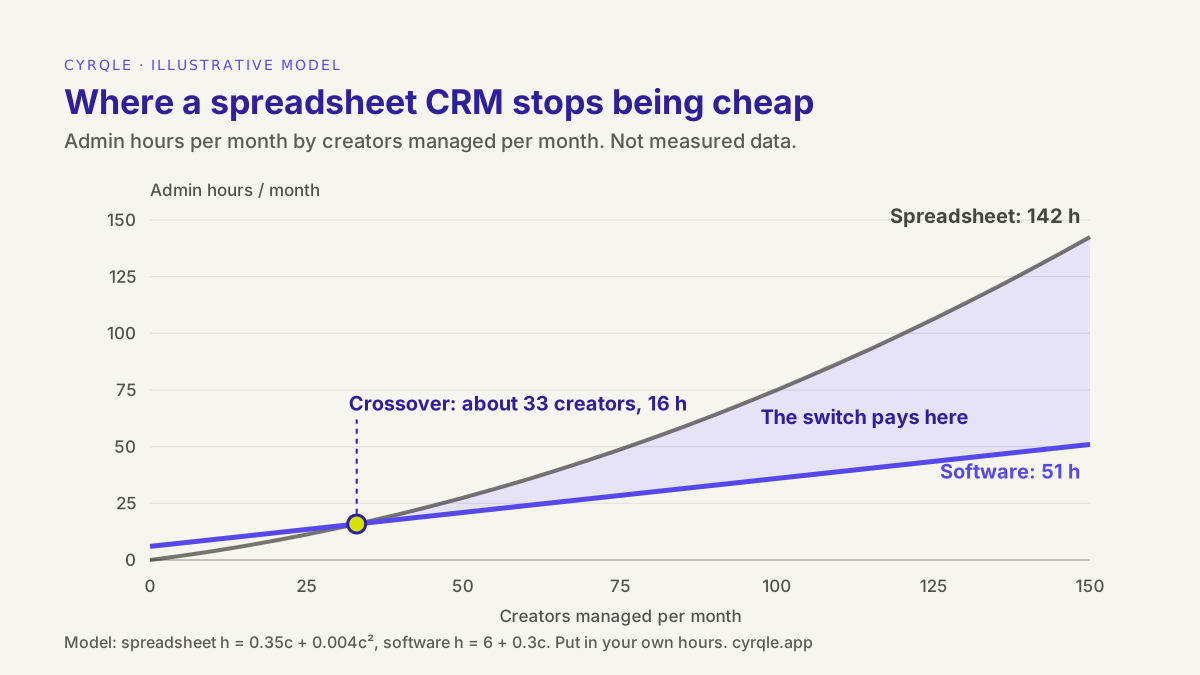
In this example, the lines cross at about 33 creators a month. Below that, a spreadsheet is cheaper because there is no setup. At 100 creators a month, the model shows 75 hours on the sheet against 36 in software. The shape matters more than the numbers: time your team for two weeks and draw your own lines.
Monthly saving and payback time for moving from a spreadsheet to software.
Illustrative defaults. Change any input.
Worked example with the defaults (illustrative, and not tied to the chart above): saving 22 hours a month at EUR 35 is EUR 770. Minus a EUR 500 licence, the net saving is EUR 270 a month. Migration takes 16 hours, or EUR 560, so it pays back in about 2.1 months. If the licence were EUR 800, the switch would not pay back on hours alone, and the case would rest on fewer errors and lower data risk. For the full agency margin model, see the margin section of the guide to agency influencer software.
How do you migrate in one afternoon?
- Freeze the sheet. Set it to view-only on a fixed date and tell the team.
- Export the handles of active creators only: anyone with a status from Contacted to Live.
- Import them into the new tool and assign owners.
- Move only active threads. Copy the agreed terms and the last touch for each one.
- Archive the rest with a deletion date. A migration is the best moment to apply your retention period.
Storing creator contact data under the GDPR
A creator's email, phone number or handle linked to a named person is personal data under the GDPR, even when you found it in a public bio. The Spanish data protection authority, the AEPD, says that when data scraping collects personal data it "sí implica un tratamiento" (it is processing). So your CRM, whatever tool it is, is a processing activity. Seven questions cover most of it:
- What is your lawful basis? For professional outreach it is usually legitimate interest (GDPR Article 6(1)(f)). In Spain, LOPDGDD Article 19 presumes legitimate interest for the contact data of sole traders and freelance professionals (many creators invoice as autónomos), "when they refer to them only in that capacity". It is a presumption, and it covers contact data, not fee history, home addresses or bank details.
- Did you tell them where you got the data? When the data does not come from the creator, GDPR Article 14 says you must give them the privacy information, including the source, at the latest at your first message if you use it to contact them. One line and a link to your privacy notice in the first email does this. The Data source column in the template records it.
- Is your cold email a commercial communication? Spain's e-commerce law, LSSI Article 21, bans unsolicited advertising or promotional email without prior consent. Many lawyers read a paid collaboration offer as a business proposal rather than advertising, but the point is not settled, so ask your adviser. In every case, give an easy way to opt out.
- How long do you keep it? The GDPR says no longer than necessary (Article 5(1)(e)). Set a period and write it down. As an example only: anonymise creators who never replied after 12 months, and keep signed contracts and payout records for as long as tax and contract law requires.
- Who has access? Remove "anyone with the link". Give each person access only to the clients they work on. Remove leavers on the day they leave.
- Who processes it for you? The vendor that hosts your sheet or CRM is a processor, so you need a data processing agreement with it (Article 28). Most agencies that run a creator database all the time should also keep a record of processing (Article 30).
- What if a creator says stop? The right to object to direct marketing is absolute (Article 21). Mark the row "Do not contact" and stop. Do not just delete it: a deleted row can be imported again next month.
How cyrqle helps
cyrqle replaces the spreadsheet columns with states and records in one workspace. It does not sync your inbox, Notion or Google Sheets, so the move is a short manual import.
- Bring your roster in. In Find creators, paste the handles from your sheet into Lookup and bulk import them into one of your Lists. Compare selected lists side by side before you invite.
- One thread per creator. In Campaigns, each creator has an outreach thread with the deal terms and templates. Log calls, WhatsApp messages and DMs with offline-contact logging, so Last touch is never a guess.
- Your move and their move. A state per creator, sorted into your move / their move buckets, replaces the Status, Owner and Next move columns. Bulk invites go out in Spanish or English by market, with two automatic follow-ups.
- Terms before invites. Invites stay blocked until compensation is complete. The Creator Collaboration Agreement is e-signed by both sides and freezes the terms. Campaign and content-wall use are always granted; paid-ads use only if ticked on the offer.
- Payouts on delivery. In compensation and contracts, a payout is scheduled when the creator delivers and a person releases it, with a statement per payout. Creators in Europe and the US get paid through Stripe Connect in EUR; elsewhere you pay by bank transfer and record it. cyrqle does not collect tax forms.
- Access by client. The agency console gives each team member access per client, which answers the "who has access" question in the sidebar. Data is hosted in the EU; see security and the data processing agreement.
Honest limits: cyrqle does not delete records for you on a retention schedule, and it is not a substitute for your privacy notice. You set those. You can still export a Creator list report as CSV from Reports whenever a client wants a spreadsheet.
For the day-to-day operating model once you have switched, read how agencies run 100 creators without a sheet.
More in this series
- What to look for in influencer software for agencies: client separation, Act-As, white-label reports and a margin model.
- Discovery tool or full platform? The four jobs of influencer software and who does each.
- Managing client brands as an agency, step by step.
FAQ
What is an influencer CRM?
An influencer CRM is a system that records your relationship with each creator: contact details, owner, conversation, agreed terms, rights, contract and payout. The glossary entry on creator relationship management covers the wider practice. A sales CRM tracks deals; an influencer CRM also has to track deliverables, content rights and payouts.
Can I use Excel or Google Sheets as an influencer CRM?
Yes, if one person owns the relationships in one market and the sheet has strict columns: owner, next move, last touch, terms, rights, contract and payout. Use dropdowns for status, one row per creator per campaign, and protected ranges for money and rights. Switch when the five signals in this guide start to tick.
How many creators can you manage in a spreadsheet?
There is no single number. One owner in one market can manage over 100 creators in a clean sheet, while four people across three markets can break one at 40. Count new contacts per month, owners per client, missed follow-ups, markets and payouts instead.
Can I use a sales CRM like HubSpot or Pipedrive for influencers?
It can work for contacts and pipeline stages. It has no native place for deliverables, usage rights, signed creator terms or payouts on delivery, so teams add custom fields and a second tool for payments. That is the same gap as a spreadsheet, with a licence on top.
Is it legal to store an influencer's email that I found on Instagram?
Usually yes, for professional outreach, on the basis of legitimate interest, and in Spain LOPDGDD Article 19 presumes it for the professional contact data of autónomos. You still have to tell the creator where you got it at your first message, keep only what you need, and stop if they object. It is not legal advice: check your case with an adviser.
How long can I keep creator data?
Only as long as you need it for the purpose you collected it for. Set and document a period, for example anonymising creators who never replied after 12 months. Keep contracts and payout records for as long as tax and contract law requires. The example period is an illustration, not advice.
Sources
- Regulation (EU) 2016/679 (GDPR), Articles 5, 6, 14, 21, 28 and 30: EUR-Lex; Article 14 text: gdpr-info.eu
- Ley Orgánica 3/2018 (LOPDGDD), Article 19: BOE-A-2018-16673
- Ley 34/2002 (LSSI), Article 21: BOE-A-2002-13758
- AEPD, "Herramientas de data scraping para la evaluación de tendencias": aepd.es
- Notion, "Data residency": notion.com
Related field notes.
How to manage an influencer ambassador program at scale: clusters, bulk invites by market and language, two follow-ups, your-move buckets and pay on delivery.
An influencer campaign compliance checklist for agencies: the six records to keep for every post, from signed contract to payout, and how to audit them fast.
How to price influencer marketing agency services: retainer, percentage of creator spend or performance fee, with a margin model for one client at three sizes.