
How to choose a UGC platform for ecommerce: source, license, display
How to choose a UGC platform for ecommerce: score each vendor on three jobs, sourcing posts, licensing them with a record and showing them in shoppable walls.
To choose a UGC platform for ecommerce, split the purchase into the three jobs the tool has to do: source posts about your brand on Instagram and TikTok, license each one from its creator with a record you can prove, and display the cleared posts on your store as shoppable walls that do not slow your pages down. Score every vendor on all three, live, on your own posts.
Most buyers start at the end. They see a beautiful gallery widget on a demo store and sign. Three months later the team is chasing creators by DM, nobody knows which tiles on the product page are still covered by a licence, and the "UGC" on the homepage is mostly the brand's own reposts. A wall is only as good as the content you are allowed to show on it.
This guide is written for ecommerce and D2C teams in Spain, the EU and Latin America. It sets out the criteria for each job, the 12 questions to ask any vendor, the main types of tool on the market, and a worked scoring example. It also says where cyrqle covers the three jobs and where it stops.
What does a UGC platform for ecommerce actually do?
A UGC platform for ecommerce turns posts that customers and creators publish about your products, user-generated content, into content on your own store, legally. It does that in three steps, and each step depends on the one before it. A tool that is strong on display and weak on licensing gives you a fast, attractive wall full of content you may not be allowed to use.
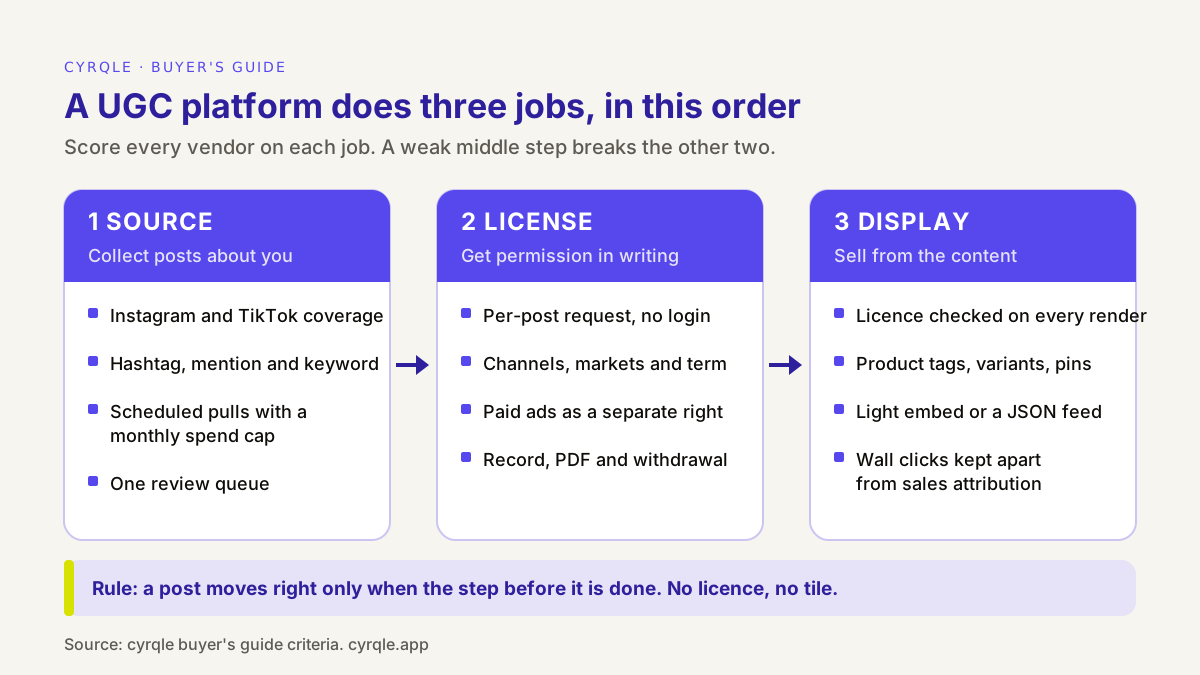
The three jobs, in one line each:
- Source. Find the posts that mention, tag or show your brand, and put them in one queue for review.
- License. Ask each creator for written permission, with a defined scope, and keep the record.
- Display. Put the cleared posts on your site, tagged with the products they show, and take them down when a licence ends.
Most tools on the market were built for one of these jobs and added the others later. Knowing which job a tool started from tells you where its weak spots are likely to be.
Job 1: How should a UGC platform source posts?
A good sourcing layer finds the posts that matter to you on the networks your customers use, at a cost you control, and puts them in one place where a person decides what to keep. Five criteria separate a useful collector from a firehose.
Networks and formats
For most European and Latin American ecommerce brands, Instagram and TikTok are where product content lives. Ask which networks the tool collects from, and which formats on each: feed photos, carousels, Reels, TikTok videos. Ask specifically about Instagram Stories. They expire after 24 hours and many tools cannot collect them, so if your customers mostly post Stories, test that before you buy.
Source types
There are three ways to find posts about you, and they behave differently:
- Hashtags (your brand hashtag, campaign hashtags) are the most reliable source of brand content.
- Mentions (people tagging your handle in a caption) catch customers who never use your hashtag. Check which networks support them.
- Keywords (product names, slogans) are broader and noisier.
A tool that only supports hashtags misses every customer who tags your handle but never types your hashtag.
Freshness and cost control
Collecting posts costs the vendor money, and that cost reaches you as credits, usage fees or plan tiers. Ask how often sources refresh, whether you can run a pull on demand, and whether scheduled pulls have a hard monthly cap. An uncapped daily pull on a broad hashtag is open-ended spend.
One review queue
Somebody on your team will decide which posts to request. That person needs one queue with filters (network, term, rights status, engagement, country) and fast keyboard review. Without it, sourcing produces a backlog nobody reads.
Paid creator content as a second source
Do not forget the content you already paid for. Creators in your campaigns produce your best material, and their contract may already grant the rights you need. A platform that treats campaign content and organic UGC as two sources for the same wall saves you a second tool.
For a hands-on version of this job, see how to set up a UGC collector.
Job 2: How should a UGC platform license posts?
A good licensing layer asks each creator for permission per post, records exactly what they agreed to, and makes the record and the live store agree with each other. This is the job buyers check least and the one that carries the most risk.
Why a public post is not permission
The creator owns the copyright in their photo or video. The people in the frame have rights over their image: in Spain, Ley Orgánica 1/1982 lists the use of a person's name, voice or image for advertising without consent as an unlawful intrusion (BOE). And a photo of an identifiable person is personal data under the GDPR, which says a controller relying on consent must be able to demonstrate it, and that consent can be withdrawn at any time (Regulation (EU) 2016/679, Article 7). Our post on UGC rights in the EU explains each of the three in more depth. None of this is legal advice: for a specific campaign, ask your lawyer.
Scope has to be written down
Spanish copyright law reads a licence narrowly. Under article 43 of the Ley de Propiedad Intelectual, a transfer that does not state its duration is limited to five years, one that does not state its territory is limited to the country where it was granted, and the uses covered are only those the contract names or necessarily implies (BOE). So a licence that says "you can use my post" without channels, markets and term may cover much less than you think. Clear usage rights name each of them. Each licence should record:
| Field | What to look for |
|---|---|
| The post | Identified by its link, not "your content" |
| Channels | Website, own social accounts, email, in-store screens |
| Paid ads | A separate, explicit yes or no |
| Markets | The countries where you will show it |
| Term | A fixed period or "perpetual", stated |
| Who and when | Handle, timestamp and the exact text they accepted |
The influencer contract template for Spain and the EU has clause wording for the same scope questions, for creators you pay. For how much paid-ads use and exclusivity tend to cost on top of a fee, see the usage rights pricing calculator.
The request has to be easy to say yes to
Most customers who post about you will never create an account on a vendor's platform. Ask how the request reaches them (email, a link you send by DM), whether they can grant rights in one or two clicks without signing up, and whether the tool sends reminders. Ask too whether you can write the terms in each language you sell in.
Withdrawal and expiry must reach the store
A licence record that lives in one system while the wall reads from another will drift. Ask the vendor what happens on your live product page, within minutes, when a creator withdraws or a fixed-term licence expires. The good answer is that the wall stops serving that post by itself. The weak answer is a report you are supposed to check.
Job 3: How should a UGC platform display posts on your store?
A good display layer turns cleared posts into shoppable surfaces, checks the licence before every post it serves, and adds little weight to the pages where you sell. Four criteria matter.
Formats that fit the page
Different pages need different blocks: a hero wall with a "get the look" rail for campaign pages, a grid for social proof on the homepage, a carousel of looks on the product page itself. Our guide to shoppable UGC walls and product pages covers which format works where.
Product tagging from your catalogue
A gallery without products is social proof. A wall where each tile links to the product in it is a sales surface. Ask where the product catalogue comes from (a live store connection, a CSV import, or manual entry), whether you can tag a specific variant, and whether you can pin the product to the spot in the image where it appears. If the catalogue does not sync, ask how prices and new products get updated.
Embed weight and install method
Product pages are where load time costs sales. Google's Core Web Vitals guidance sets "good" at a Largest Contentful Paint within 2.5 seconds, an Interaction to Next Paint of 200 milliseconds or less, and a Cumulative Layout Shift of 0.1 or less (web.dev). A UGC widget should not move any of these. Ask for the size of the script that loads on every page, whether the heavy rendering code loads only where a wall exists, whether images lazy-load, and whether the block reserves its space so the page does not jump. Then measure a test page before and after install.
Ask how the wall is installed, too. An app from your store platform's app store, a snippet pasted into your theme, and a JSON feed you render yourself each suit different teams. A snippet needs someone comfortable editing a theme; a feed needs a developer; an app is easiest to install but adds its own dependencies.
Analytics that do not overclaim
Wall analytics should show impressions, clicks and product click-through, and point you to popular posts with nothing tagged. Be careful with any tool that reports "revenue influenced by UGC" as one number. A click on a wall tile is engagement, not a sale. Sales attribution needs order data and a stated method. Our post on measuring on-site UGC impact shows how to keep the two apart.
The 12 questions to ask any UGC vendor
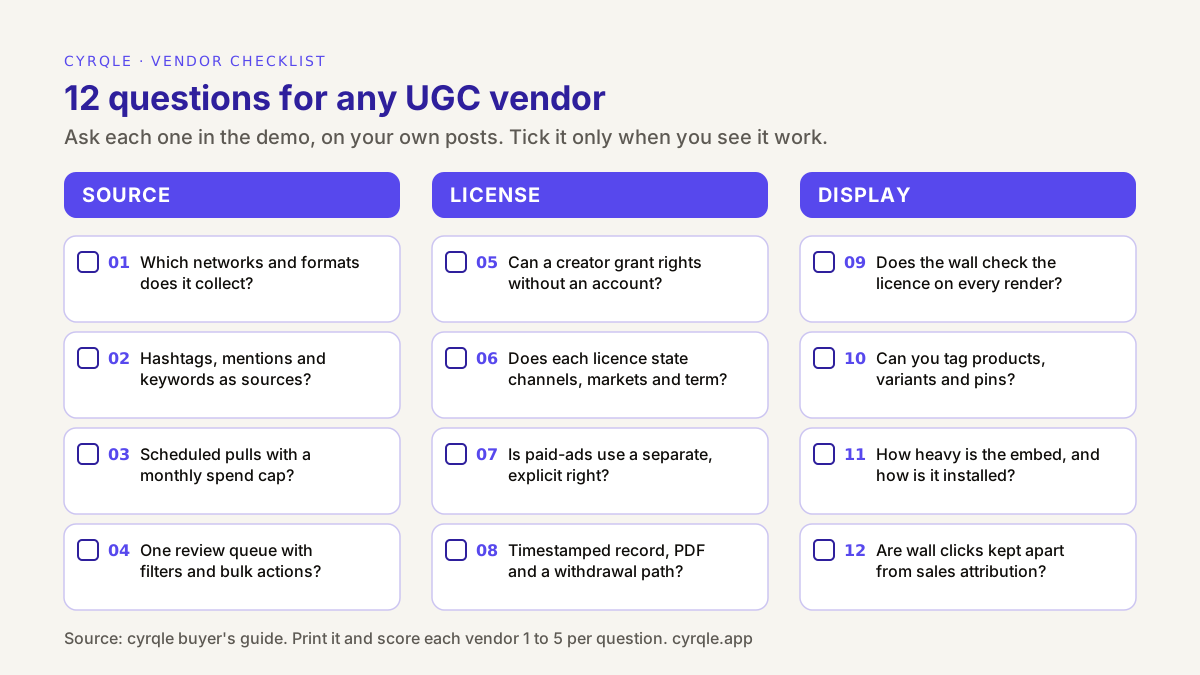
Use these questions in every demo, on your own posts and your own store, not on the vendor's sample account. Tick a question only when you see it work.
| Job | Good answer | Red flag | |
|---|---|---|---|
| 1. Which networks and formats does it collect? | Source | A named list per network, including whether Stories are covered | 'All social networks' with no list |
| 2. Hashtags, mentions and keywords as sources? | Source | All three, with the network limits stated | Hashtags only |
| 3. Scheduled pulls with a monthly spend cap? | Source | Daily or weekly schedules with a hard cap per source | Unlimited pulls priced 'by usage' with no cap |
| 4. One review queue with filters and bulk actions? | Source | Filters by network, term, rights status and engagement; keyboard review | An export to a spreadsheet |
| 5. Can a creator grant rights without an account? | License | Email or DM link, one-click grant, automatic reminders | The creator must sign up to the vendor's app |
| 6. Does each licence state channels, markets and term? | License | Your own terms, per language, stored with each grant | A generic 'brand may use' checkbox |
| 7. Is paid-ads use a separate, explicit right? | License | Yes, asked and recorded separately | Owned and paid use bundled in one permission |
| 8. Timestamped record, PDF and a withdrawal path? | License | Per-post record with who, what, when; creator can withdraw | A screenshot of a comment saying 'yes' |
| 9. Does the wall check the licence on every render? | Display | Expired or withdrawn posts drop off by themselves | 'Remove it manually when you are notified' |
| 10. Can you tag products, variants and pins? | Display | Tags from your catalogue, with variant and pin position | A single 'shop now' link per wall |
| 11. How heavy is the embed, and how is it installed? | Display | A small loader; renderer only where a wall exists; install method stated | No answer on script size |
| 12. Are wall clicks kept apart from sales attribution? | Display | Engagement and attributed sales reported separately, with method | One 'UGC revenue' figure with no method |
Two questions sit outside the three jobs and still belong in the demo: where your data is stored (for an EU brand, ask for the sub-processor list and a data processing agreement), and what you can export if you leave, especially the licence records. Our 12-point checklist for influencer marketing platforms covers both in more detail.
Which types of tool can do the three jobs?
Tools that sell "UGC for ecommerce" usually come from one of five starting points. The type tells you which job they do best and which one to test hardest. The table describes categories, not named vendors; many products sit between two types.
| Type of tool | Usually strongest at | Test hardest |
|---|---|---|
| Reviews app with photo and video reviews | Collecting content from verified buyers on your own site | Social sourcing; rights scope beyond the review terms |
| Social gallery or widget tool | Display: layouts, product tags, fast install | Licensing record; whether walls check licences |
| Social listening tool | Sourcing: wide network coverage, mentions | Rights requests and on-site display, often absent |
| Rights management tool | Licensing: requests, terms, records | Display and product tagging, often through a partner |
| Influencer or creator commerce platform with UGC features | Linking paid creator content, rights and walls in one record | Depth of organic sourcing and display options |
There is also a sixth option: do it yourself. A shared hashtag search, DMs asking "can we use this?", a spreadsheet of answers and some theme code. It works for 20 posts. It breaks when you have hundreds across several markets, because nobody can say which tiles on the live site are still covered.
Worked example: scoring two vendors for a fashion store
All figures in this section are illustrative.
A fashion D2C brand in Valencia sells on Shopify in Spain and Mexico. It expects to surface about 300 posts a month from its hashtags and mentions and to license about 40. It plans walls on the homepage and on its 20 best-selling product pages.
First it sets weights before any demo. Licensing gets the most weight because the brand sells in two markets and wants to reuse some posts in paid ads later:
| Job | Weight | Vendor A (gallery tool) | Vendor B (rights-first platform) |
|---|---|---|---|
| Source | 30% | 3 | 4 |
| License | 40% | 2 | 5 |
| Display | 30% | 5 | 3 |
| Weighted score | 3.2 | 4.1 |
Vendor A has the best-looking walls and installs in minutes. But its licence step is a hashtag terms page plus a comment reply, with no per-post record and no market or term stored, and its wall does not check licences. Vendor B records every grant with scope and removes withdrawn posts automatically, but has fewer layouts.
Two more checks change the picture:
- Knockout rule. If either vendor had scored 1 on question 8 (the licence record), the brand would drop it whatever the total. Here Vendor A scored 2: weak, but not out.
- Time cost of the gap. If Vendor A is chosen, someone has to track 40 licences a month by hand. At an illustrative 10 minutes per post to request, record and later check expiry, that is about 6.7 hours a month, or roughly 80 hours a year, before any withdrawal is handled.
The brand picks Vendor B and accepts fewer layouts. The lesson generalises: a weak licence layer costs time every month, while a weak display layer usually costs a little design flexibility.
How cyrqle helps
cyrqle covers all three jobs in one workspace, with one record that follows each post from the collector to the wall. Here is what it does, and where it stops.
Source. In UGC collectors, you collect Instagram and TikTok posts by hashtag, mention or keyword. Mentions work on Instagram only. Each source runs in Existing mode (posts cyrqle already holds) or Live mode (a fresh pull from the platform), and scheduled monitors run daily, weekly or monthly with a monthly credit cap per source. Every post lands in one review queue with filters and a keyboard Rapid review. Instagram Stories are not collected.
License. You request rights from the post card. cyrqle emails the creator a grant link, or gives you the link to send by DM when there is no email on file, and sends email reminders. The creator does not need an account: they allow or decline, and can later withdraw from the same link. You write your rights templates per language, so channels, markets and term are in your own words. Every licence is stored on the Agreements page with its status (Active, Expired, Revoked), its origin and a PDF. For creators you pay through a campaign, the signed agreement grants content-wall and campaign use, and paid-ads use only when you tick it on the offer. The step-by-step version is in how to request content rights from a creator.
Display. Content walls come in three types (content wall with a shoppable hero, social wall, product page wall) and four layouts (grid, masonry, carousel, bento). You tag products with a variant and a pin position. A wall serves a post only while your brand holds an active, unexpired licence for it, so a withdrawal or expiry removes the tile on the next render. The embed loads a small loader script and fetches the wall renderer only on pages that contain a wall; there is also a JSON feed for custom front ends. Wall analytics report composition, engagement and product clicks, separately from sales attribution.
The limits, stated plainly:
- Shopify is a theme snippet, not an app. You paste the wall snippet into a Custom Liquid section of your theme. There is no Shopify App Store listing and no one-click install. Products come from a Shopify CSV export, and there is no live catalogue sync, so you re-import after price or range changes. The Shopify integration page covers the pixel and order webhooks for sales tracking, and embedding a content wall on Shopify walks through the install.
- Two networks. Instagram and TikTok only. No YouTube, X, Facebook or Pinterest sourcing.
- Collectors use credits. Live runs and scheduled monitors spend credits; set the cap.
- No public price. Brand plans are a custom monthly base plus usage.
If you only need photo reviews from verified buyers on your product pages, a reviews app may be all you need. If you want to source, license and display creator and customer content from one record, book a 30-minute demo and run the 12 questions on your own posts.
FAQ
What is the difference between a UGC platform and a reviews app?
A reviews app collects content from buyers on your own site, usually under the review terms. A UGC platform sources posts from social networks, asks each creator for a licence and displays the cleared posts. Some brands use both: reviews for verified-buyer proof, a UGC platform for social content.
Do I need a licence to show an Instagram post on my product page?
Yes, in practice. Sharing a post inside Instagram with its native features is covered by the platform's terms. Downloading it or embedding it on a commercial page is a use that needs the creator's permission, and the consent of anyone recognisable in it. This is not legal advice.
Can a UGC platform collect Instagram Stories?
Many cannot, because Stories disappear after 24 hours. Ask each vendor directly and test it on your own account. cyrqle does not collect Stories today.
Will a UGC wall slow down my Shopify store?
It should not if the embed is built well: a small loader on every page, the renderer only where a wall exists, lazy-loaded images and reserved space. Measure Core Web Vitals on a test page before and after install.
How many posts do I need before a UGC platform is worth it?
There is no fixed threshold. A useful test is the licence record: if you cannot say today which posts on your live site are covered, for which markets and until when, you have outgrown spreadsheets and DMs.
Sources
- Ley Orgánica 1/1982, de 5 de mayo, de protección civil del derecho al honor, a la intimidad personal y familiar y a la propia imagen, article 7.6: https://www.boe.es/buscar/act.php?id=BOE-A-1982-11196
- Real Decreto Legislativo 1/1996, Ley de Propiedad Intelectual, article 43: https://www.boe.es/buscar/act.php?id=BOE-A-1996-8930
- Regulation (EU) 2016/679 (GDPR), Article 7, conditions for consent: https://eur-lex.europa.eu/eli/reg/2016/679/oj
- Google, Web Vitals (thresholds for LCP, INP and CLS): https://web.dev/articles/vitals
Related field notes.
A public post is not a licence. What brands in Spain, the EU and Latin America need before they reuse customer and creator content: copyright, image rights, GDPR, clear usage terms and a record you can prove.
How to turn rights-cleared creator and customer content into commerce surfaces on your own site: landing-page walls, social-proof grids and product-page carousels, with products tagged on every tile.
How to tell whether the creator content on your site is earning its place. The metrics that matter at each step, from wall impressions to product clicks to attributed orders, and the traps that make the numbers look better or worse than they are.