
Getting paid through Stripe Connect: a creator's walkthrough
How to get paid as a creator with Stripe Connect: what onboarding asks for and why, when a payout is scheduled and released, and how to read your statement.
To get paid through Stripe Connect, you set up a payout account with Stripe once: your identity, your address and the bank account that receives the money. After that, every collaboration follows the same path. You deliver, the brand accepts the delivery, a payout is scheduled, a person on the brand side releases it, and Stripe sends the money to your bank.
Picture a fitness creator in Bilbao who has just signed her first paid deal through a platform. The contract is clear. Then a screen asks for her date of birth, her home address and a photo of her ID, and she stops. Is this safe? Who sees it? When does the money arrive? This walkthrough answers those questions from the creator's side: what onboarding asks for and why, when a payout moves, how to read the statement, and what happens if you live outside the regions Stripe covers.
How does getting paid through Stripe Connect work?
Stripe Connect is the part of Stripe that lets a platform pay other people: sellers on a marketplace, drivers, or creators. You do not need a Stripe business account or a website. You get a connected account that holds your payout details, and the platform sends money to it.
The path has five steps. Only the first one happens once.
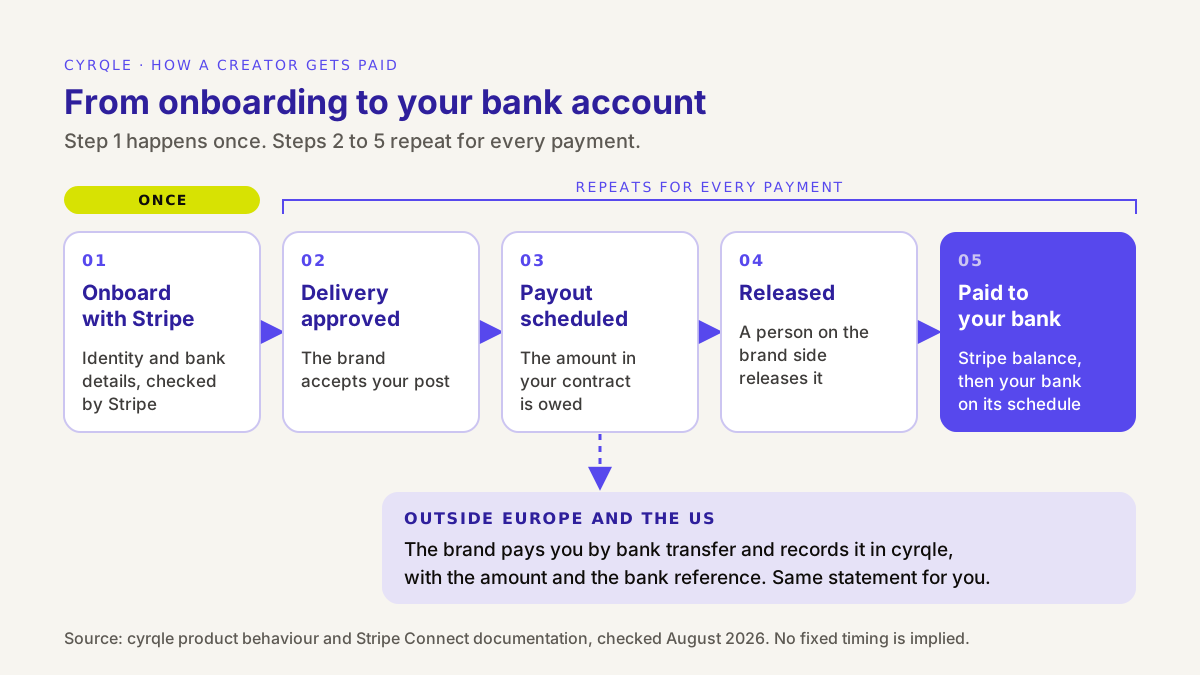
- Onboard with Stripe. You fill in Stripe's form once. Stripe checks your identity and your bank details.
- Delivery approved. You publish what the contract says. The brand checks the post and accepts it.
- Payout scheduled. The payout is created for the amount your contract says is due for that delivery.
- Released. A person on the brand side releases the payout from the campaign funds.
- Paid to your bank. The money lands in your Stripe balance, and Stripe pays it out to your bank account on your payout schedule.
The important part for your cash flow: steps 3 and 4 are separate. "Scheduled" means the money is owed and waiting. "Released" means someone pressed the button.
What does Stripe onboarding ask for, and why?
Onboarding asks for the information a regulated payment provider needs to identify the person it pays. That is called "know your customer" (KYC), and anti-money-laundering rules in the EU and the US require it. The brand does not run these checks, and neither does the platform. Stripe does.
Stripe's documentation says it directly: with Express accounts, "Stripe handles onboarding, account management, and identity verification" (Stripe docs).
What you are asked for depends on your country and on whether you are an individual or a company. For an individual, expect most of this list:
| What Stripe asks | Why it asks | Tips |
|---|---|---|
| Country | Decides which rules and which documents apply | Pick the country where you pay tax. In cyrqle it cannot be changed after the account is created |
| Individual or company | Decides whether Stripe verifies you or your company | Most creators are individuals or autónomos. Choose "company" only if you invoice through an S.L. or similar |
| Legal first and last name | Identity check against official records | Use the name on your ID, not your handle |
| Date of birth | Identity check | Use the date on your ID |
| Home address | Identity check and the account's country | Use the address you would give your bank |
| Phone and email | Verification codes and login to your Stripe dashboard | Use a phone you keep, because Stripe sends login codes to it |
| ID or tax number (for example, the last 4 digits of an SSN in the US) | Identity check and tax reporting where the law requires it | Have it ready before you start |
| Identity document | Requested when Stripe cannot verify you from the data alone, or above certain amounts | A clear photo of your DNI, NIE or passport, in good light |
| Bank account (IBAN in Europe) | Where your payouts go | The account must be in your name, or your company's name |
| A website or a short description of what you do | Stripe asks what activity the account is for | A short, honest description of your creator activity is enough |
Stripe can ask for more later. Some items are only "eventually due", for example when your total payouts pass a threshold. Stripe's required verification information page explains how requirements vary by country and account type. If Stripe needs something, your payout settings in the app show "Stripe still needs a few more details before payouts can flow", with a button to resume on Stripe.
Who sees your documents?
Your ID photo and your full identity data go into Stripe's form, not to the brand. The brand sees whether you can receive a Stripe transfer ("Stripe ready", "Stripe setup unfinished" or "No Stripe payout account"). It does not need your passport to pay you, and it does not get it.
Is it safe?
Stripe is a regulated payment provider. The onboarding page is hosted by Stripe, so check the address bar shows a stripe.com address before you type anything. A real platform sends you to Stripe from inside your account. It does not send you a random link by DM asking for your ID. If you get one, treat it as a scam.
When is a payout scheduled, and when is it released?
A payout is scheduled when the brand accepts your delivery, and it is released when a person on the brand side settles it. Neither step is a fixed clock, so do not plan your rent around a promised day.
Here is what each status means in your Payouts page:
| Status | What it means | What you can do |
|---|---|---|
| Scheduled | Your delivery was accepted and the amount is owed | Nothing. Check the amount matches your contract |
| Pending | The payout is in progress | Wait. If it stays here for long, ask the brand |
| Paid | The transfer reached your Stripe balance | Check your Stripe balance and your statement |
| Failed | The transfer did not go through | Check your Stripe account for missing details, then tell the brand |
| Cancelled | The payout will not be made | Ask the brand why, with your contract in hand |
Why a person releases the payout
Money that leaves a brand's campaign should be checked by someone: was the post published, does it match the brief, is the disclosure there? In cyrqle the brand funds the campaign in advance, so the money is set aside before you start. The release step is a human approval on top of that. It protects both sides, and it means timing depends on the brand's team.
If your contract states a payment term (for example, within 30 days of posting), that term is what you can hold the brand to. The creator's guide to brand deals explains how to write payment terms into a deal before you sign.
From your Stripe balance to your bank
"Paid" in the app means the money reached your Stripe balance. Stripe then sends it to your bank on your payout schedule. Stripe's payouts documentation says three things worth knowing:
- Your payout schedule controls when Stripe sends money to your bank. In the Express dashboard you can see your balance, money on the way to your bank and the expected arrival date of the next payout (Stripe docs).
- Settlement timing varies by country, and your first payout usually takes longer than later ones.
- Your bank may take extra time after it receives the money.
In the app, your Payouts page shows your Stripe balance as "Available", "Clearing in Stripe" or "Pending", and your "Last bank payout". The link "Manage balance, schedule & bank on Stripe" opens your Stripe dashboard.
What does the payout statement show?
Every payout has a record you can download, and each collaboration has a statement that shows the full history: what was agreed, every payment against it, any deductions and what is still owed. That is the document to check against your contract and your invoice.
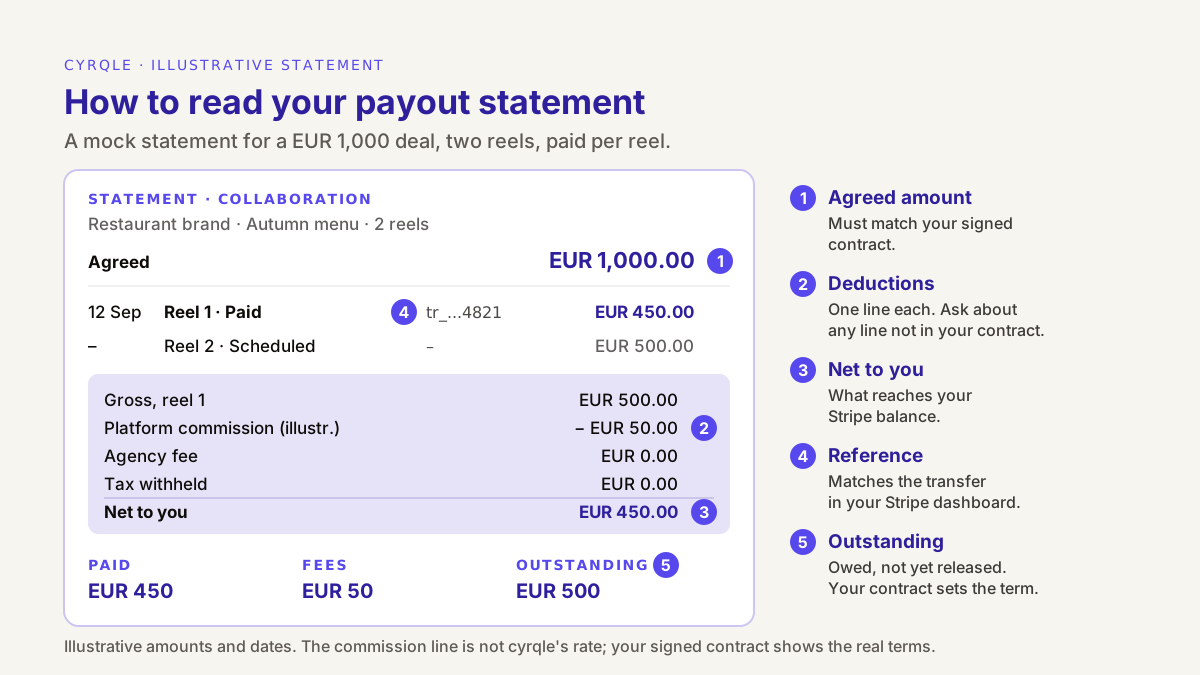
Worked example (illustrative)
A food creator in Valencia agrees EUR 1,000 for two reels with a restaurant brand, paid per reel. The numbers below are made up to show how the statement reads. They are not cyrqle's commission rate.
| Line | Reel 1 | Reel 2 |
|---|---|---|
| Status | Paid | Scheduled |
| Gross for this payment | EUR 500 | EUR 500 |
| Platform commission (illustrative) | EUR 50 | shown when paid |
| Agency fee | EUR 0 (no agency on this deal) | EUR 0 |
| Tax withheld | EUR 0 (see note) | EUR 0 |
| Net to you | EUR 450 | due |
| Transfer reference | Shown on the statement | none yet |
The statement summary for this deal reads: agreed EUR 1,000, paid EUR 450 net, fees EUR 50, outstanding EUR 500.
Three things to check every time:
- The agreed amount matches your signed contract. In cyrqle the terms are frozen when both sides sign, so there is one source of truth.
- Every deduction has a name. Platform commission, agency fee and tax withheld each have their own line. If a line is not in your contract, ask before you accept it.
- The net matches what reached your Stripe balance. Use the transfer reference to match them.
A note on "tax withheld": in Spain, a Spanish company that pays a professional may have to withhold IRPF on account of your income tax. Whether that applies depends on your situation and on who pays you. The statement shows the line only when something was withheld. It is a record, not tax advice.
Which countries does Stripe Connect cover, and what happens elsewhere?
In cyrqle, Stripe Connect payouts cover creators in Europe and the US, and settlement is in euros. Stripe documents that platforms in the EEA can transfer funds to connected accounts in the US, the UK, the EEA, Canada and Switzerland, and that self-serve cross-border payouts do not go beyond those regions (Stripe docs). Within that, cyrqle supports creators in Europe and the US.
If you live somewhere else, for example in Mexico, Colombia or Argentina, nothing about the deal changes except the rail. When you choose your country in payout settings and Stripe cannot pay out there, the app tells you so before you start: you are paid by bank transfer instead. The brand sends the transfer from its own bank and records it in cyrqle with the amount and the bank reference. Your payout list and statement still show the payment.
| Where you live | How you are paid | Currency |
|---|---|---|
| Spain and the rest of Europe | Stripe Connect to your bank | EUR |
| United States | Stripe Connect to your bank | EUR |
| Latin America and other regions | Bank transfer from the brand, recorded in cyrqle | As agreed in your contract |
Settlement is in euros. If your bank account is in another currency, check in your Stripe dashboard how conversion is handled before your first payout, and agree in the contract who bears any bank charges on an international transfer. The brand-side view of this is in paying creators in other countries.
What can delay a payout, and how do you fix it?
Most delays come from one of four causes. Three of them you can fix yourself.
| Cause | How you notice | Fix |
|---|---|---|
| Onboarding not finished | Payout settings show "Stripe Connect — incomplete" | Click "Resume on Stripe" and finish the form |
| Stripe needs more information | A banner lists items such as "Identity document" or "Overdue information" | Upload what Stripe asks for, in Stripe's form |
| Bank details wrong or account closed | A payout shows "Failed" | Update your bank in "Manage on Stripe", then tell the brand |
| Delivery not yet accepted, or release not yet done | The payout shows "Scheduled" or nothing yet | Check the post matches the brief, then ask the brand politely, citing the contract |
Finish onboarding before you film. A brand can accept your delivery the day you post, but money cannot move to an account that Stripe has not verified.
What about commission deals and product gifts?
Not every collaboration is a cash fee.
- Commission on every sale. Your sales are tracked with your own promo code and tracking link, and the commission you are owed is calculated and shown. It is not paid automatically: paying it is a separate step that the brand takes, and it then shows up as a payout like any other.
- Product gift. There is no payout, because you are paid in product. The product can still have tax consequences in Spain, so ask your gestor.
- Combinations. A cash fee plus commission produces a fixed payout on delivery and separate commission payments later.
You still send an invoice
A payout statement is a payment record, not an invoice. If you are registered as self-employed in Spain, you still issue your own invoice to the brand, with the right IVA and IRPF lines, and keep the statement next to it. Our guide on how to invoice a brand collaboration in Spain includes a template and the cases by brand country.
This section is general information, not legal or tax advice. For your situation, ask a gestor or tax adviser.
How cyrqle helps
cyrqle is a creator commerce platform where brands run campaigns and pay creators. On the creator side, the payout path is built into the same workspace as your briefs and contracts.
- Terms first, money set aside. A brand cannot invite you until the compensation is set, and both sides e-sign the Creator Collaboration Agreement. The brand funds the campaign wallet before payouts are due. See compensation and contracts.
- Stripe onboarding inside the app. In your payout settings you pick your country, then click "Connect with Stripe". The page shows your status ("Stripe Connect — active", "incomplete" or "not set up") and what Stripe still needs. Identity checks happen on Stripe's side. The Stripe integration page covers how the connection works.
- A payout per delivery. When the brand accepts your delivery, a payout is scheduled. A person on the brand side releases it, so it is not instant, and you get a notification when a payout is scheduled and when it is sent.
- A record you can check. The Payouts page lists pending and paid earnings with filters, and each collaboration has a statement with the agreed amount, every payment, each deduction and what is outstanding.
- Honest coverage. Stripe payouts cover Europe and the US and settle in euros. Elsewhere, the brand pays by bank transfer and records it, so your history stays complete.
cyrqle is free for creators. See cyrqle for creators to join the waitlist.
FAQ
Do I need a Stripe account before I join?
No. You create your Stripe payout account from inside the app, the first time you set up payouts. It is a connected account for receiving money, not a full Stripe business account, and you can log in to its dashboard with your email and a code sent to your phone or email.
Why does Stripe want my ID when the brand already knows me?
Because the law requires the payment provider to identify the person it pays, whatever the brand knows. Stripe runs the identity check, and the brand does not receive your documents. Sometimes Stripe verifies you from your name, date of birth and address alone, and asks for an ID only if it cannot.
How long does a payout take?
There is no fixed number of days. A payout is scheduled when the brand accepts your delivery and moves when a person on the brand side releases it. After that, Stripe's payout schedule, your country's settlement timing and your bank decide when the money appears in your account. Your contract's payment term is the date you can hold the brand to.
Can I get paid through Stripe if I live in Mexico or Colombia?
Not through Stripe Connect in cyrqle today. Stripe payouts cover creators in Europe and the US. In other countries the brand pays you by bank transfer and records the payment in cyrqle, so you still see it in your payouts and on your statement.
Is my payout statement an invoice?
No. The statement records what was agreed, what was paid, the deductions and the transfer reference. If you invoice as a professional, you still send your own invoice to the brand and keep both documents.
Sources
- Stripe, Using Express connected accounts: Stripe handles onboarding, account management and identity verification.
- Stripe, Required verification information: what connected accounts must provide by country and account type.
- Stripe, Payouts: payout schedules, settlement timing by country and first-payout timing.
- Stripe, Express Dashboard: balance, upcoming payouts, bank account and login.
- Stripe, Cross-border payouts: regions covered for platforms in Europe.
Related field notes.
An agency paying influencers on behalf of a client must settle who funds, who invoices, who withholds IRPF and how its fee shows. Worked EUR 1,000 payout split.
How to pay influencer commission every month: count attributed orders net of refunds, hold for returns, send a statement, pay against an invoice, reconcile.
The cost of an influencer collaboration in Spain, worked in euros: fee, commission, product, IRPF withholding, IVA, and payment, platform and agency fees.